(800) 728 8391



Quick summary:
- Referrals still bring in the largest share of real estate clients, but referred prospects vet you online first. Reputation is the top factor sellers weigh when picking an agent (35%, per NAR’s 2025 Profile).
- The bar for reviews keeps rising: 68% of consumers now want at least a 4-star rating, 47% skip businesses with fewer than 20 reviews, and 74% look for reviews from the last three months (BrightLocal, 2026).
- Ask every client for a review with a direct link, and reply to every review within a day or two. 89% of consumers expect a response.
- Never gate reviews or pay for them. Google bans both, and the FTC’s rule against fake reviews and incentives tied to positive reviews carries penalties of up to $53,088 per violation.
- When you answer a negative review, protect client confidentiality. Correcting the record is never worth revealing a client’s finances or motives.
What does reputation management mean for real estate agents?
Reputation management for real estate agents is the ongoing work of tracking reviews and feedback about you online, earning a steady stream of new reviews, responding to what clients say, and putting your best reviews to work in your marketing.
It’s less about damage control than about keeping your public record current and consistent, so a positive reputation keeps working for you long after each closing.
It matters more in the real estate industry than for most local businesses because the purchase is huge and infrequent. Nobody buys a house every month, so a prospect can’t judge you from their own past experience. They lean on everyone else’s.
NAR’s 2025 Profile found that the agent’s reputation is the single most important factor sellers consider when choosing a listing agent (35%), ahead of honesty and trustworthiness (22%) and being a friend or family member (15%).
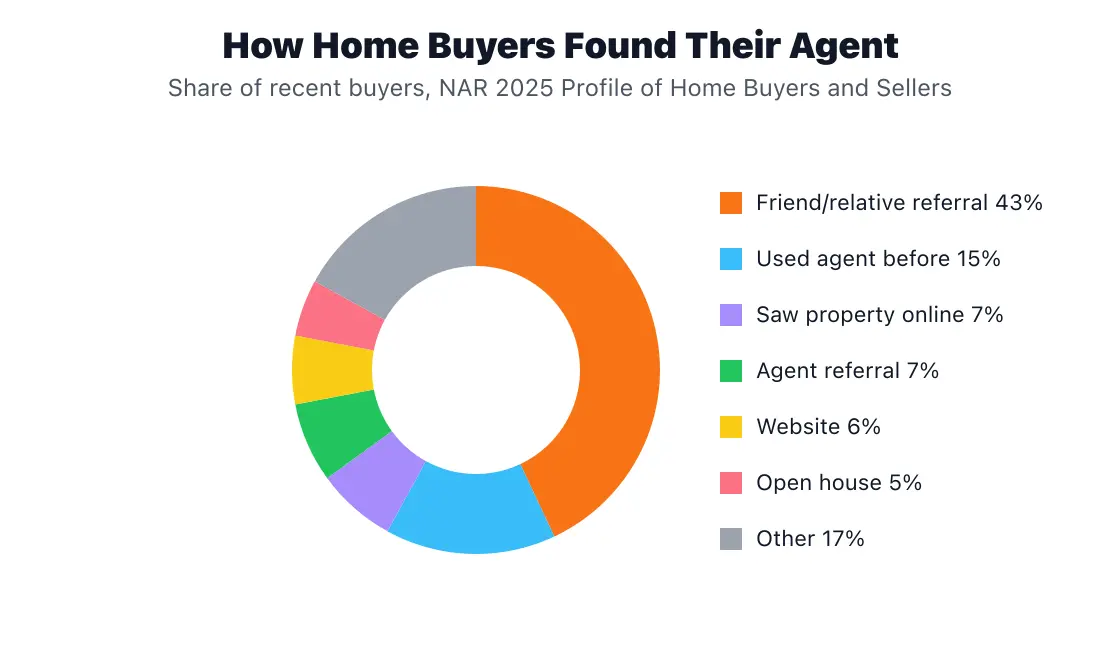
Source: NAR 2025 Profile of Home Buyers and Sellers (full report), Exhibit 4-6.
Referrals and online reviews aren’t separate channels. They work as a relay. Zillow’s 2025 Consumer Housing Trends Report for Agents found that 33% of buyers say online research played a key role in choosing their agent, and 47% of buyers hired the first agent they spoke with. A referral gets your name onto the shortlist. Your online reputation decides whether you’re the first call.
Loyalty doesn’t protect you either. The same Zillow report found that 79% of repeat buyers would consider working with their previous agent again, yet only 13% of repeat buyers actually hired their agent based on that past experience. Past clients drift unless something maintains your visibility, and your reviews and responses are one of the few things they’ll see between transactions.
Where do clients check your reputation?
Google is still the most-used place to read reviews, but it’s losing ground quickly, and AI assistants have become a real review surface in the space of a year.
BrightLocal’s 2026 Local Consumer Review Survey found that the percentage of consumers reading reviews on Google fell from 83% to 71%, while use of ChatGPT and other AI tools for local recommendations jumped from 6% to 45%. The average consumer now uses six different review platforms.
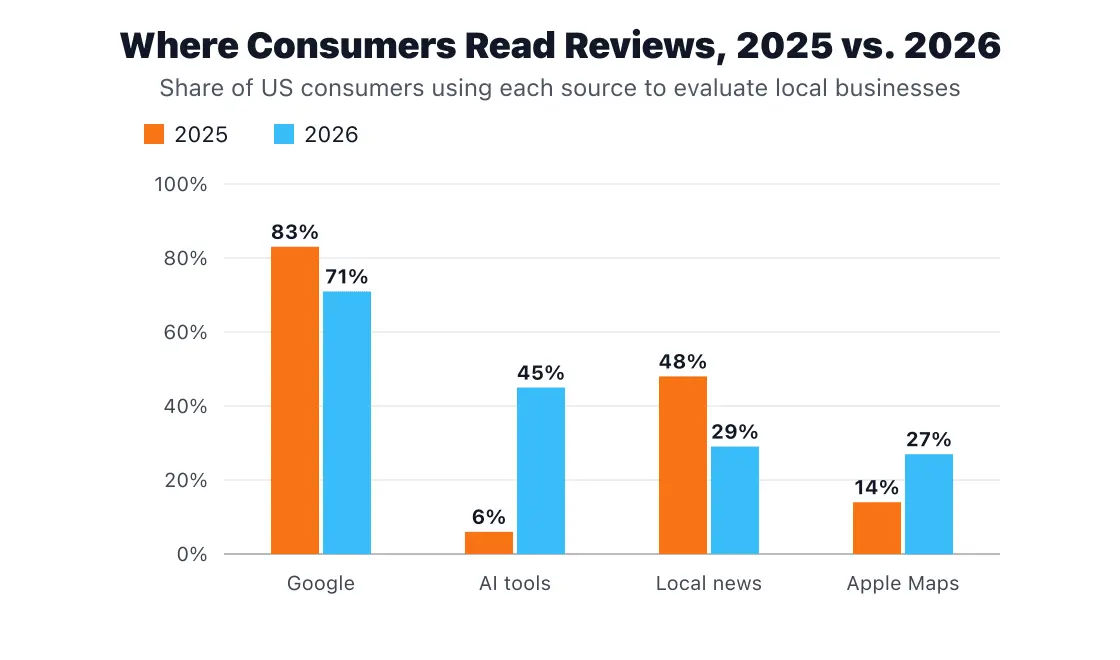
Source: BrightLocal Local Consumer Review Survey 2026.
For agents, managing your online reputation now means covering four kinds of platforms.
1. Google Business Profile
Your Google Business Profile shows up when someone searches your name or “real estate agent near me,” and its reviews are one of the signals search engines use to rank businesses in local search.
A complete profile with recent reviews is one of the simplest local SEO wins available to agents, and the most direct way to increase visibility with prospects who haven’t heard of you yet. Claim it, verify it, keep your hours and service areas accurate, and make it the default destination for review requests if you only send clients to one place.
2. Zillow, Realtor.com, and Homes.com
Real estate portals carry extra weight because buyers and sellers are already on them. Keep your agent profile on each one complete, with a current photo, a strong real estate bio, and recent sales.
Portal reviews are also where prospects look for details about how you handled a specific kind of deal, so encourage clients to mention whether they were buying, selling, or both.
3. Facebook and social platforms
Facebook recommendations still matter, and some clients will look for you on other social media platforms like Instagram, YouTube, or TikTok, where short video testimonials are easy to share. You don’t need to be everywhere, but every profile you do keep should look maintained.
4. AI assistants and review summaries
AI-driven tools like ChatGPT don’t have their own reviews. They summarize what’s written about you elsewhere. BrightLocal found that 82% of consumers read AI-generated review summaries, and 23% rely on them alone to make a decision.
The popularity of AI tools as information sources is only going to rise. To make sure you have the best chance of getting mentioned by AI, check out our AEO guide.
The practical takeaway: an AI assistant can only describe you well if your profiles are consistent and your reviews are detailed. A review that says “Maria helped us sell our condo in Back Bay in three weeks” gives an AI system far more to work with than “Great agent!”
What does a strong review profile look like?
Consumers screen your profile on three things: your star rating, how many reviews you have, and how recent they are. The rating thresholds in particular rose sharply between 2025 and 2026.
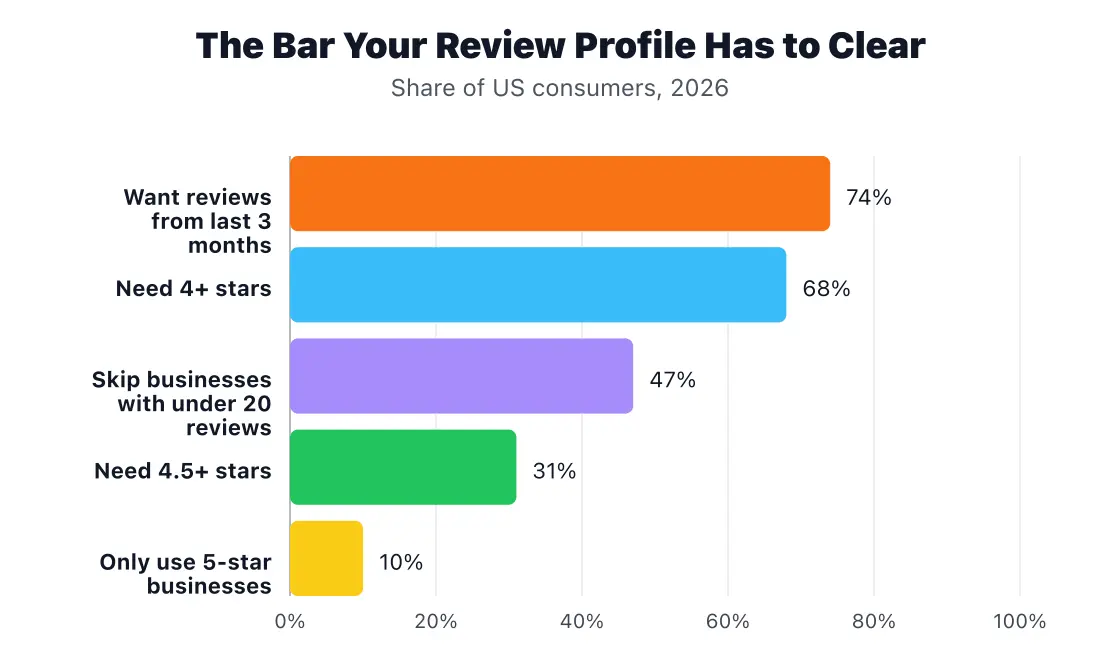
Source: BrightLocal Local Consumer Review Survey 2026.
The rating floor is climbing. 68% of consumers now require at least four stars (up from 55% a year earlier), and 31% won’t use a business rated below 4.5 stars, up from 17%.
Volume matters too, and 20 is a useful target for any agent who’s closed a few dozen deals but only has a handful of reviews to show for it. Nearly half of consumers (47%) won’t use a business with fewer reviews than that.
Recency may be the easiest threshold to miss, since almost three in four consumers (74%) look for reviews written in the last three months. An agent with 60 glowing reviews from 2021 can look less active than a newer agent with 15 recent reviews.
Perfection, on the other hand, isn’t the goal. Only 10% of consumers say they’ll only use a business with a five-star rating. When BrightLocal asked what makes a review trustworthy, “consistent sentiment across multiple reviews” ranked first at 56%, ahead of a high star rating (42%). One three-star review among 30 strong ones won’t sink you, and a wall of identical five-star reviews may look less believable than a realistic 4.8.
How to get more reviews (without breaking the rules)?
The most reliable way to get more reviews is to ask every client, at the moment they’re happiest, with a link that takes them straight to the review form.
Asking works: BrightLocal found that 78% of consumers were asked to leave feedback for a business, and 83% of people who were asked went on to leave a review. For more scripts and timing tips, see our guide on how to ask your clients for reviews.
Time the ask around the handoff
The best windows in every real estate transaction are easy to spot:
- Closing day or key handoff. Relief and gratitude peak here. A personal ask in the moment, followed by a text with the link that evening, works better than an email a month later.
- The first-week check-in. A quick “How’s the move going?” message a few days after closing is a natural place to ask if you didn’t at the table.
- After a milestone for sellers. Accepted offer, clear-to-close, or the final walkthrough are all moments when a seller has just seen your work pay off.
Make it a one-tap job
Send a direct link to your Google review form and your Zillow or Realtor.com profile, not a general instruction to “find me online.” Texting the link often works best. Zillow’s 2025 report found that 50% of buyers who used an agent prefer texting or messaging apps, compared with 33% who prefer phone calls.
A simple request might read:

“Hi Dana, it was a pleasure helping you and Chris find the house on Elm Street. If you have two minutes, a short Google review would mean a lot and helps other buyers know what to expect: [link]. Thanks again, and enjoy the new place!”
It’s fine to suggest what’s helpful to mention (the neighborhood, whether you helped them buy or sell). It isn’t fine to script what they say or ask for a specific rating. For more tactics on collecting praise from past clients, see how to get real estate testimonials.
Know the rules before you ask
Two sets of rules apply to every review request. Staying compliant with both is the simplest way to reduce risk, because breaking them can cost far more than a bad review.
Google’s policy. Google prohibits businesses from offering incentives such as payment, discounts, or free goods and services in exchange for reviews. It also bars businesses from choosing to “discourage or prohibit negative reviews, or selectively solicit positive reviews from customers.” That second rule bans review gating: sending happy clients to Google and routing unhappy ones to a private feedback form. Violations can get reviews removed and profiles restricted.
The FTC’s Consumer Reviews and Testimonials Rule. In effect since October 21, 2024, the rule bans fake reviews (including AI-generated ones) and undisclosed reviews from insiders. It also prohibits incentives conditioned on a positive review, as well as threats or intimidation used to get negative reviews removed. In December 2025, the FTC sent warning letters to 10 companies and noted that violations can carry civil penalties of up to $53,088 each.
In practice, that means:
- Ask every client, not just the ones you know had a good experience.
- Keep closing gifts completely separate from review requests.
- Don’t have your spouse, team members, or transaction coordinator review you on Google at all; Google’s conflict-of-interest policy bans those reviews even with a disclosure. On other sites, the FTC rule requires disclosing the relationship.
- Never buy reviews or use a service that “boosts” your rating.
How to respond to reviews, good and bad
Reply to every review, quickly and in your own words. 89% of consumers expect business owners to respond to reviews, and 80% say they’re likely to use a business that responds to all of its reviews (BrightLocal, 2026). Canned replies backfire: generic or templated responses put off 50% of consumers.
Speed now counts too. The number of consumers who expect a same-day reply more than tripled in a year.
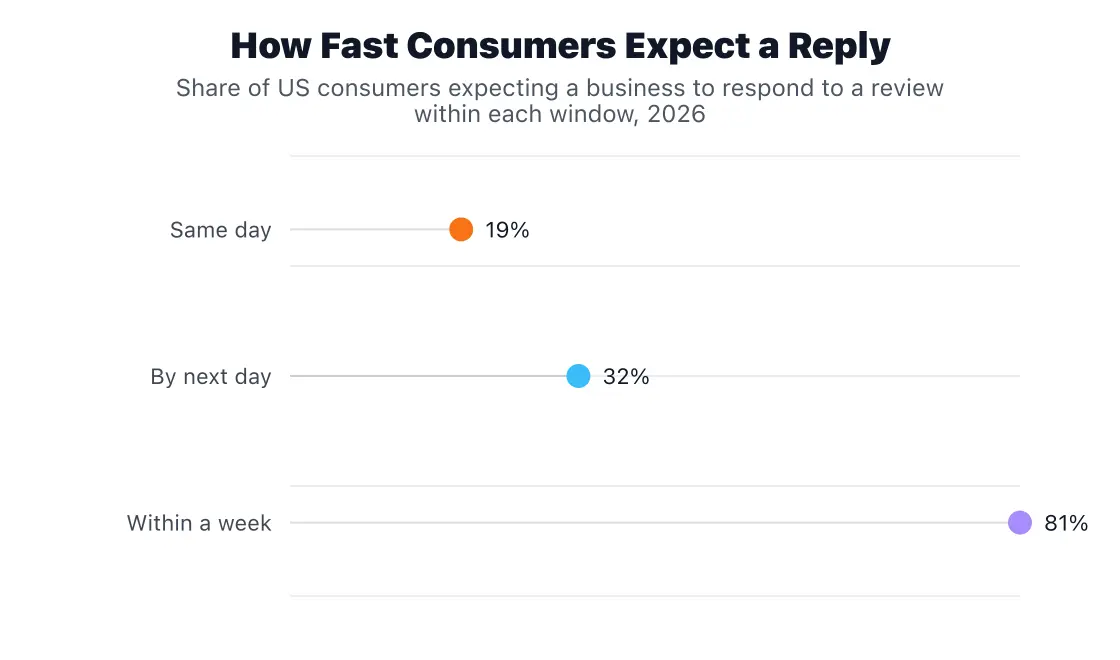
Source: BrightLocal Local Consumer Review Survey 2026. Same-day expectations rose from 6% in 2025; next-day expectations rose from 18%.
A realistic target for a busy agent is a response within 24 hours on weekdays. Set review alerts on Google and each portal so new reviews land in your inbox instead of waiting for you to check.
Replying to positive reviews
Good feedback deserves a reply as much as criticism does. Keep it short, specific, and personal. Thank the client by name, mention something real from the transaction, and stop there.
“Thank you, [name]! Finding a three-bedroom under budget in Maplewood during a spring market took some patience from both of us, and I’m so glad the house on Linden came through. Enjoy the backyard this fall.”
Replying to negative reviews
A negative review is also a public audition. Many readers will pay as much attention to how you handle the complaint as to the complaint itself. A good reply acknowledges the client’s frustration, avoids arguing the details, and moves the conversation offline.
“Hi Mark, I’m sorry the closing timeline was so stressful. That’s not the experience I want any client to have. I’d like to understand what I could have done better. Please call me directly at [number] when you have a few minutes.”
The confidentiality line agents can’t cross
This is where real estate reputation management differs from a restaurant’s or a plumber’s. Agents owe clients confidentiality under most state license laws and, for REALTORS®, under the NAR Code of Ethics, and that duty doesn’t end because a client left a harsh review. Never reply with details about a client’s finances, credit, reasons for moving, negotiation position, or anything else they shared in confidence, even if it would prove your side of the story.
A reply like “The buyer’s financing fell through, which is why the deal was delayed” might feel like setting the record straight. It’s also a disclosure of private client information on a public page. When in doubt, keep the public reply general and handle the specifics in a private conversation. If a response involves legal or licensing questions, check with your managing broker first.
What to do about fake, unfair, or retaliatory reviews
You can’t delete a legitimate negative review, but you can report one that breaks platform rules and respond calmly while it’s under review. Reviews that typically qualify for removal include ones from people who were never your clients, reviews meant for a different agent, harassment or hate speech, and reviews posted by a competitor.
Here’s how to handle it:
- Report it through the platform. Google Business Profile lets you report a review directly from your dashboard and check its status. Zillow, Realtor.com, and Facebook each have their own reporting tools for reviews that break their guidelines.
- Reply publicly while you wait. A short, factual note helps readers: “We don’t have a record of working together, but I’d be glad to talk if there’s been a mix-up. Please call me at [number].”
- Keep adding legitimate reviews. A steady flow of recent, detailed reviews is the most effective way to put one bad review in context.
What not to do matters just as much. Don’t threaten the reviewer, demand they take it down, or offer money or a refund in exchange for removal. The FTC rule specifically prohibits using unfounded legal threats, intimidation, or false accusations to prevent or remove negative reviews, and Google’s policy bans incentives for revising or removing one. Talk to an attorney only when a review makes false statements of fact that could be defamatory, not when you simply disagree with a client’s opinion of your service.
It also helps to keep one bad review in perspective. 77% of consumers say negative reviews deter them, but only 10% insist on a flawless rating. A thoughtful response to a fair complaint often earns more trust than the complaint costs. For other missteps worth avoiding, see 6 reputation mistakes you don’t know you’re making.
A simple reputation management routine
A good reputation strategy is a small, steady habit rather than a scramble after a bad review. Build these best practices into your weekly workflow, and thirty minutes a week covers most of it.
| How often | What to do |
|---|---|
| Weekly | Reply to every new review. Send review requests to clients who closed in the past week. Check that new reviews have posted. |
| Monthly | Confirm your name, phone, photo, and service areas match across Google, Zillow, Realtor.com, Homes.com, Facebook, and your website. Ask an AI assistant about agents in your area and note how it describes you. Share one new testimonial on social or in email. |
| Quarterly | Track feedback trends: your rating, total review count, and number of reviews from the last three months on each platform. Refresh your bio and headshot. Decide whether you need tools to automate requests and alerts. |
Best real estate online reputation management tools
You may not need a separate tool at all. Many real estate CRMs can automate review requests when a deal closes, and a solo agent closing a couple of deals a month can handle the rest by hand. Dedicated real estate reputation management software starts to pay off once you’re juggling several review sites, working on a team, or running a brokerage where dozens of agents need the same workflow.
The five tools below cover that range. RealSatisfied and Testimonial Tree were built for real estate and plug into portals like Realtor.com and Zillow. NiceJob is a budget-friendly option for small teams, while Birdeye and Podium are all-in-one management solutions for brokerages that want to centralize reviews, texting, listing management, and reporting.
The right reputation management tool depends on how many deals you close and how many people need access. Whichever you choose, check that its request flow sends every client to the review site and doesn’t filter out unhappy ones first. That’s exactly the review gating Google prohibits.
| Tool | Best for | Starting price | G2 rating |
|---|---|---|---|
| RealSatisfied | Agents and brokerages who want real estate-specific testimonials | $15/month (Agent PRO, billed annually) | No reviews yet |
| Testimonial Tree | Agents and teams automating requests after closing | $45/month (Basic) | 4.0 (2 reviews) |
| NiceJob | Small teams that want simple, hands-off review requests | $75/month (Starter) | 4.8 (419 reviews) |
| Birdeye | Multi-office brokerages that need an all-in-one platform | Custom quote | 4.7 (4,234 reviews) |
| Podium | Brokerages that want reviews and client texting in one inbox | Custom quote | 4.5 (2,109 reviews) |
RealSatisfied
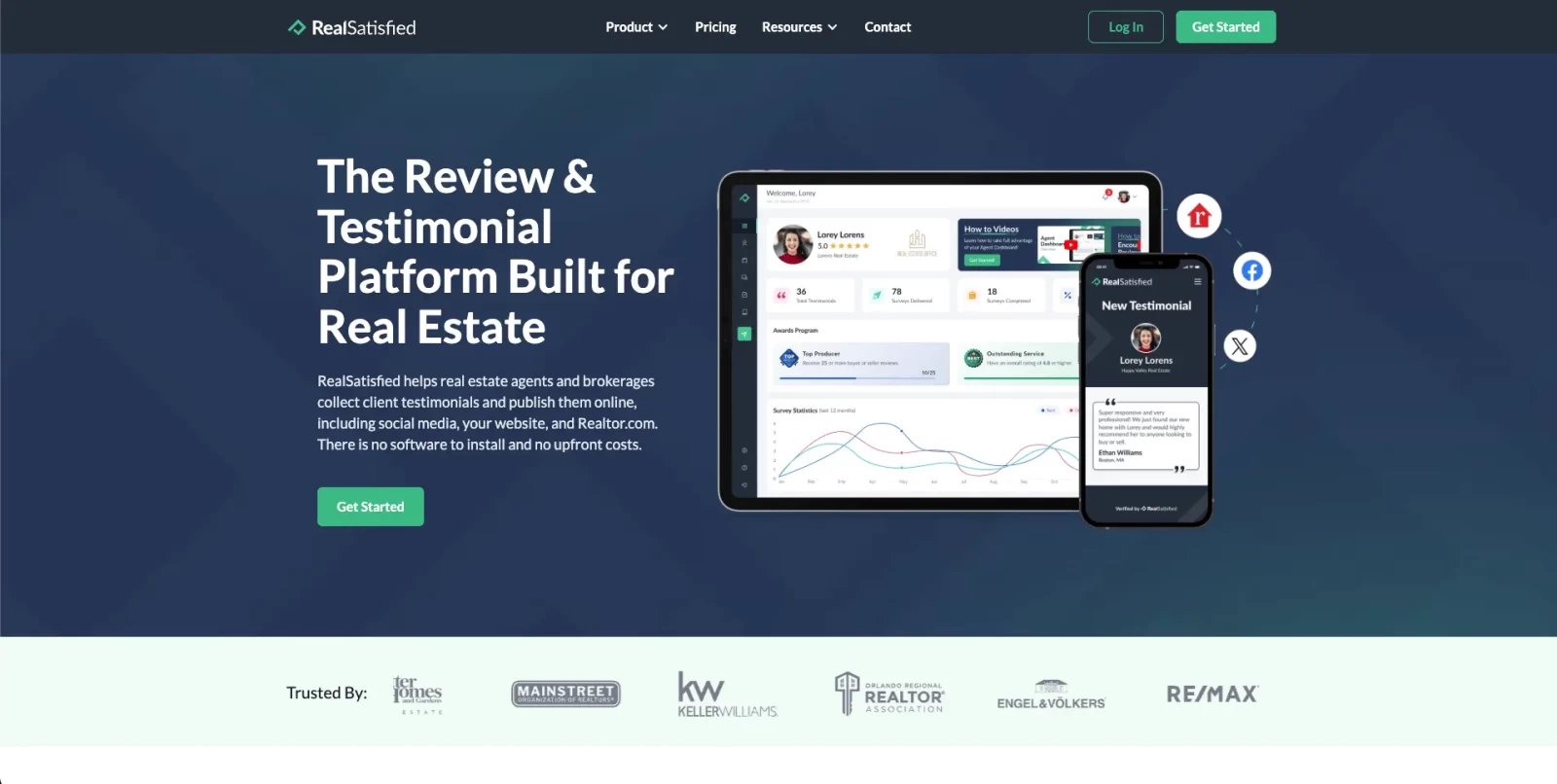
RealSatisfied is a review and testimonial platform built specifically for real estate professionals: agents, brokerages, and associations. It sends a satisfaction survey after each closed transaction, turns the responses into verified testimonials, and publishes them to your profile page, your website, and Realtor.com.
It’s especially common at the brokerage level. Brands including Coldwell Banker, Century 21, RE/MAX, Keller Williams, and Sotheby’s use it, and the broker plan adds reporting that lets managers compare client satisfaction across offices and agents.
Key features:
- Automated review requests after every closed transaction
- Testimonial syndication to Realtor.com, your website, and social media (Facebook, X, LinkedIn, Instagram)
- Prompts that encourage happy clients to post on your Google Business Profile
- Customizable agent profile page that updates automatically with new reviews
- Website widget and WordPress plugin
- Client escalation management and brokerage benchmarking on broker plans
Pricing:
- Agent LITE: Free, limited to your first 3 testimonials (available through partners only)
- Agent PRO: $19/month, or $15/month billed annually ($180/year)
- Broker PRO: $125/month, includes the first 15 agents
- Enterprise: Custom pricing
Rating: RealSatisfied doesn’t have any user reviews on G2 yet. Its customer list of national brokerage brands is the best available signal of how the industry rates it.
Testimonial Tree

Testimonial Tree is a testimonial management system with plans built specifically for real estate. It automates review requests by email and text, collects the responses in one place, and pushes them out to Google, Facebook, Zillow, Realtor.com, LinkedIn, and your website.
Higher tiers connect to your CRM or transaction system, so it can send requests automatically when a deal closes. Pro plans also add NPS surveys you can send at different points in the client lifecycle, which help brokers spot unhappy clients before a problem turns into a public review.
Key features:
- Automated email and SMS review requests with reminders
- Testimonial distribution to Google, Facebook, Zillow, Realtor.com, and LinkedIn
- Website testimonial feed and SEO-friendly business profile
- Social sharing to Instagram, Facebook, X, and LinkedIn
- Review monitoring hub that tracks public reviews across sites
- CRM integrations and NPS surveys on Pro and Enterprise plans
Pricing:
- Basic: $45/month, 1 user and up to 15 testimonial requests per month
- Pro: $150/month plus a $300 one-time setup fee, 12 users and up to 100 testimonial and 100 survey requests per month
- Enterprise: Custom pricing, unlimited users and requests
Rating: 4.0/5 on G2 (2 reviews).
NiceJob
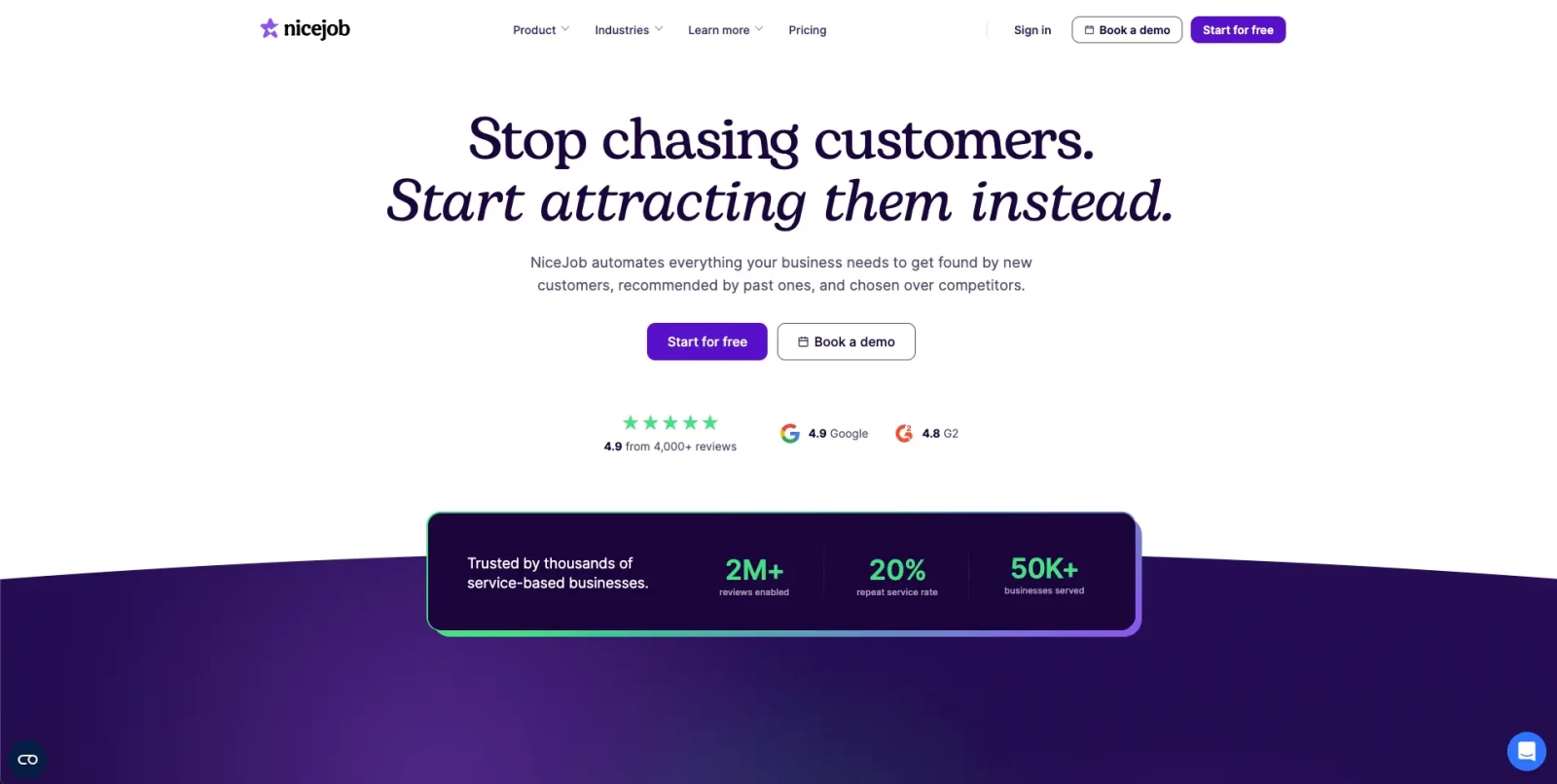
NiceJob is a review and referral tool built for small service businesses. It isn’t real estate-specific, but its simple setup and flat pricing make it a practical fit for solo agents and small teams. Once it’s connected, it sends review requests and follow-ups automatically, then reposts your best reviews to social media and your website.
The Pro plan goes beyond reviews with referral campaigns, repeat-business reminders, and AI-drafted review replies, which helps if you want to stay in touch with past clients between transactions.
Key features:
- Automated review requests and follow-up reminders
- Social proof widgets that display reviews on your website
- Automatic sharing of new reviews to social media
- AI-suggested replies to reviews (Pro)
- Referral and repeat-customer campaigns (Pro)
- NPS surveys and competitor tracking (Pro)
Pricing:
- Starter: $75/month
- Pro: $125/month
- 14-day free trial, no contracts, cancel anytime
Rating: 4.8/5 on G2 (419 reviews). Users praise how effortlessly it collects reviews, with automation that noticeably increases review volume without extra work. The most common complaint is that clients are sometimes confused about which site to post their review on.
Birdeye
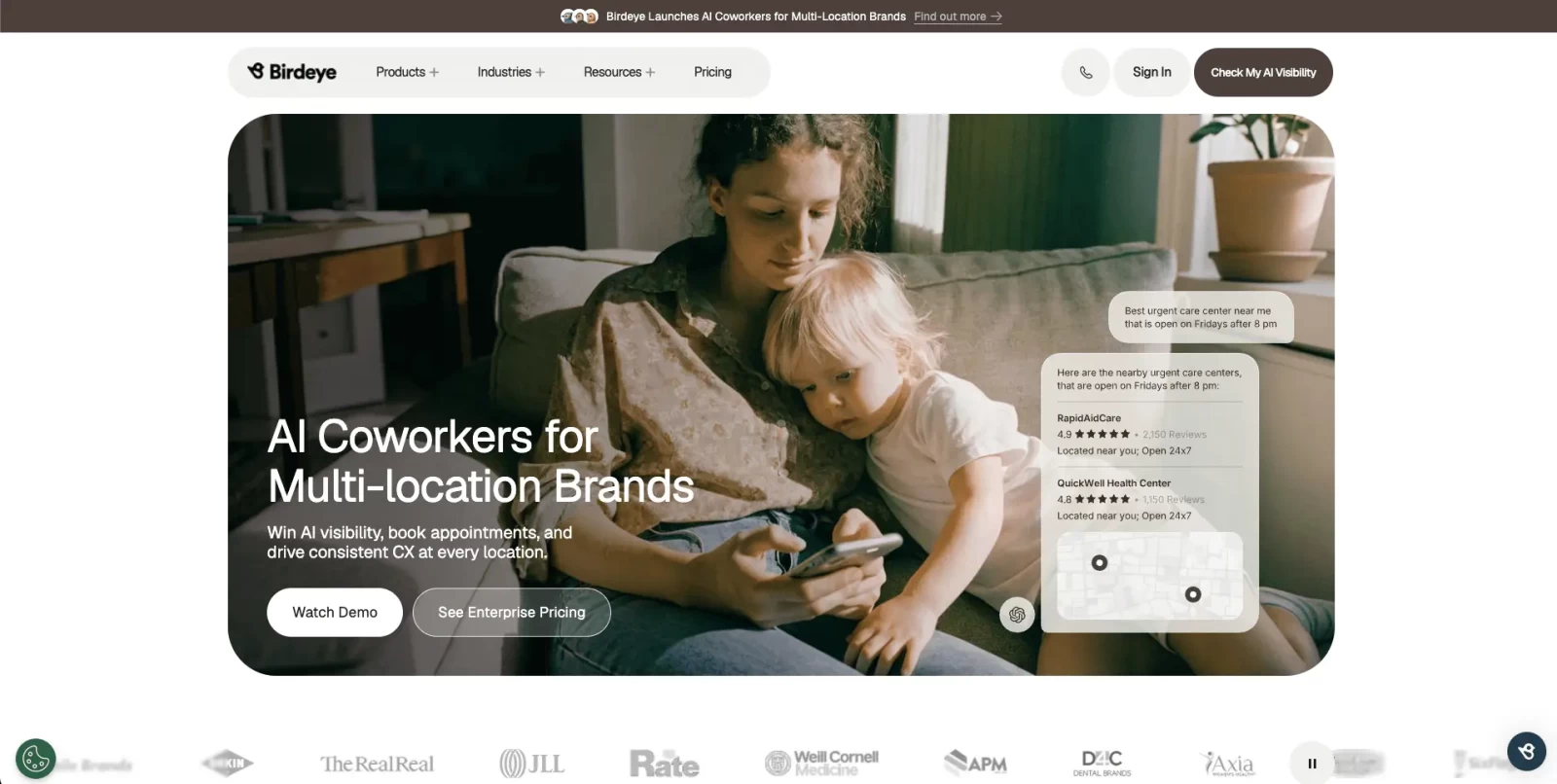
Birdeye is an all-in-one customer experience platform used by large multi-location businesses, including real estate brokerages. Along with review requests and responses, it manages business listings, social media, and client messaging from one dashboard.
Its AI features draft review replies and summarize what clients say across platforms. That makes it more platform than most solo agents need, but it’s a strong fit for brokerages managing dozens of agents and several offices.
Key features:
- Automated review requests by text and email
- AI-generated review responses
- Review monitoring across Google, Facebook, Zillow, and other sites
- Business listings management to keep office information consistent
- Social media publishing and a shared messaging inbox
- Multi-location reporting and sentiment analysis
Pricing:
- Starter, Growth, and Dominate plans, priced per location
- Birdeye doesn’t publish prices; you’ll need to request a quote
Rating: 4.7/5 on G2 (4,234 reviews). Users appreciate how easy it makes managing reviews across multiple platforms from one place. The most common complaint is that the interface can be confusing, especially for new users.
Podium

Podium combines review management with business texting. Clients can get a review request, ask a question, and receive payment requests through the same text thread, and a shared inbox is designed to unify every client conversation for your team.
For real estate, that texting-first approach fits how clients already like to communicate. Zillow’s 2025 report found that 50% of buyers prefer texting or messaging apps. The trade-off is price, which puts Podium closer to a brokerage tool than a solo-agent one.
Key features:
- Text-based review requests for Google and Facebook
- Shared inbox for texts, web chat, and messages from several channels
- Website chat widget that turns visitors into text conversations
- Text marketing campaigns
- AI lead response (AI Employee available as an add-on)
- Payments by text
Pricing:
- Core, Pro, and Signature plans
- Podium doesn’t publish prices; plans are quoted by sales
Rating: 4.5/5 on G2 (2,109 reviews). Users like how it centralizes client messaging, reviews, and payments in one place. The most common complaint is price, which many small businesses find expensive.
Put your reputation to work in your marketing
Reviews build trust best when they appear where prospects are making decisions, not just on the platform where they were written. BrightLocal found that 54% of consumers go on to check a business’s website after reading positive reviews, so your site is where much of your reputation gets tested. Here’s a step-by-step plan to leverage your real estate reviews.
In a competitive market, prospects also decide fast. Zillow found that 47% of buyers and 59% of sellers hired the first agent they spoke with, which means the reviews prospects see before that first call carry a lot of weight. Ways to put yours in front of them:
- Your website. Add a testimonials page and feature two or three short reviews on your homepage and About page. A real estate agent website with a built-in testimonials section makes this easy to keep current.
- Listing presentations. Add reviews from sellers in the same neighborhood or price range as the prospect to your listing presentation materials. Since reputation is the top factor sellers weigh, this is where reviews give you the clearest competitive edge.
- Social media. Turn strong reviews into simple graphics or short video clips for your social media marketing, and tag the client only with permission.
- Email. Add a rotating testimonial to your newsletter, drip campaigns, or other content marketing.
One caution from the FTC rule: if a page on your site presents itself as showing all or most of your reviews, don’t quietly leave out the negative ones. Featuring a handful of favorites is fine. Suggesting a curated selection is your complete record isn’t. For ideas on organizing all this social proof in one place, see the Realtor Reviews Worksheet and our guide to using positive real estate reviews in your marketing.
The bottom line
Your website is where much of that reputation gets tested. Placester’s websites include built-in testimonial sections and IDX search, so prospects who come from a referral or a review find a site that backs up what they’ve heard.
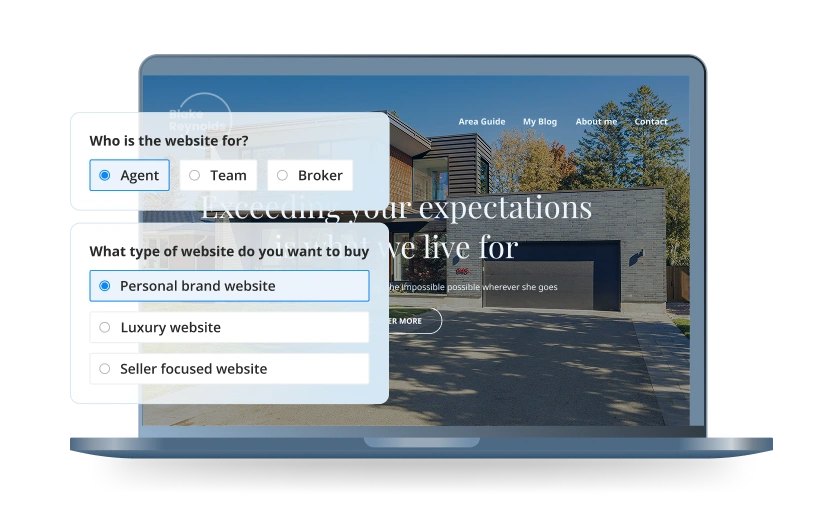
If you don’t have a real estate website, you can change that very quickly. With Placester’s AI website builder, creating stunning pages only takes a few minutes. Best of all, you don’t have to hire a developer or a designer. Just use prompts to turn your vision into an amazing-looking website.
AI Websites for Real Estate
Get a custom, ready-to-edit website
in less than 4 minutes.
Frequently asked questions
What is reputation management in real estate?
Reputation management in real estate is the process of monitoring what clients say about an agent or brokerage online, collecting new customer reviews, responding to feedback, and using positive reviews in marketing. For agents, it matters because reputation is the top factor sellers consider when choosing a listing agent, according to NAR’s 2025 Profile of Home Buyers and Sellers.
Can a real estate agent remove a bad Zillow or Google review?
Only if the review breaks the platform’s rules, such as a review from someone who was never your client, a review meant for another agent, or harassment. Report those through the platform’s reporting tool. For a legitimate negative review, the best option is a calm, professional reply and a steady flow of new reviews.
Can I give clients a gift for leaving a review?
Not on Google. Google’s policy prohibits incentives of any kind in exchange for reviews. The FTC’s rule also bans incentives that are conditioned on a positive review. A closing gift is fine as long as it has nothing to do with whether or what the client posts.
Published on
(Last updated on
)