 (800) 728 8391


Updated on
Choosing The Best Real Estate CRM Software: 10 Tools + Tips for Agents

Quick summary:
- 🎯 Start from your workflow. Define what slows you down before comparing options to filter the best CRM software for your business.
- 🤖 Use AI and automation to stay consistent. With modern tools, you don’t have to rely on memory or manual tracking.
- 📊 Focus on what moves deals forward. Choose features that help you respond faster and stay organized.
A real estate CRM is where you manage leads and move deals forward. It stands for Customer Relationship Management and can also be called a real estate database, contact manager, or sales automation platform. Instead of juggling spreadsheets, you keep every client interaction in one place. That changes how you work day to day.
70%
70% of organizations rely on CRMs for customer service, 64% for B2B marketing automation and sales force automation, and 62% for field service.
Source: Forrester
In real estate, where timing and consistent follow-up decide who wins the deal, that kind of system isn’t optional anymore. It’s the difference between scattered activity and a controlled pipeline.
If you’re serious about building predictable deal flow, you need tools that match your operating model. In this guide, you’ll find a breakdown of 10 real estate CRM platforms worth your attention, along with practical tips to help you choose one that fits your workflow.
| Name | Best for | Pricing | Rating |
|---|---|---|---|
| Placester | Website + CRM in one (lead generation focus) | $59–$129/mo or $566–$1,238/year (for agents) | 4.9 / 5 (Google) |
| Zoho CRM | Customizable workflows and automation | $14–$52/user/mo (annually) or $20–$65 (monthly) + free plan | 4.1 / 5 (G2) |
| Real Geeks | Inbound leads from IDX websites | Pricing on request | 4.5 / 5 (G2) |
| Pipedrive | Visual pipeline and deal tracking | $14–$79/user/mo (annually) or $24–$99 (monthly) | 4.5 / 5 (Capterra) |
| Wise Agent | All-in-one CRM for solo agents | $49/mo or $499/year | 4.4 / 5 (Capterra) |
| Lone Wolf | Brokerage-level operations and compliance | Pricing on request | N/A |
| Follow Up Boss | Fast lead response and follow-up | $58–$833/mo (annually) or $69–$1000 (monthly) | 4.6 / 5 (Capterra) |
| HubSpot CRM | Scalable CRM with strong integrations | From $9–$15/user/mo + free plan | 4.4 / 5 (G2) |
| Ixact Contact | Relationship-focused follow-up system | From $46.75/mo (annually) | 4.5 / 5 (G2) |
| Buildout | Commercial real estate workflows | From $125/user/mo | 4.9 / 5 (Capterra)* |
What is real estate CRM software?
Real estate CRM software is a system that helps you manage leads, track client interactions, and move deals from first contact to closing in a structured, organized way.
Picture a typical week. New inquiries come in from your website, a past client texts you about selling, and two more leads show up from a referral. Without a system, details slip. You forget who preferred which neighborhood and follow up late. You lose momentum. A CRM changes that dynamic. It gives you a single place where every interaction lives, so when you open a contact, you see the full story and know exactly what to do next.
74%
74% of agents already use CRM systems in their real estate business.
Source: realoffice360
Real estate professionals rely on CRMs to automate lead capture and keep communication consistent across email, calls, and texts. They don’t have to guess who to contact because every next step is clearly mapped out in the system.
CRM software isn’t new. What’s different now is how much these tools can do on their own. Modern CRMs use AI to:
- Draft emails
- Suggest follow-up timing
- Score leads based on behavior
- And even surface insights you would have missed
Instead of just storing information, the software starts guiding your decisions. You spend less time managing tasks and more time focusing on conversations that move deals forward.
👉 Learn more about CRM in real estate.
Why real estate agents need CRM software: 12 key benefits
Real estate agents need CRM software to keep control over their pipeline and close deals faster. Think about how it works. Do you win because you had one good call? Or do you win because you stayed present at the right moments? A CRM helps you do exactly that. It keeps your leads organized, reminds you when to act, and keeps your workflow structured, even when your pipeline fills up.
The main benefits of real estate CRM software include:
💻 Centralized lead and contact management
Every inquiry, note, and preference sits in one place. You don’t lose context when a conversation picks up after a few weeks.
🧲 Automated lead capture
New leads flow in from your website, landing pages, and ads without manual input, so you can respond while interest is still high.
⏳ Time savings on repetitive tasks
Logging calls, sending emails, updating statuses—all of these actions happen faster or automatically. That gives you more time for actual conversations.
51%
In modern CRMs, 51% of the total ROI comes from saving time and making everyday work more efficient.
Source: Nucleus Research
🚩 Consistent follow-up without manual tracking
The system schedules reminders and sequences that keep communication moving even when your calendar fills up.
👀 Clear pipeline visibility
You can see exactly where each deal stands, which helps you prioritize the opportunities that need attention now.
🤝 Stronger client relationships
When you remember details and follow up on time, clients notice. That’s often what turns a one-time deal into repeat business or referrals.
🎯 Improved conversion rates
When leads don’t slip through the cracks and follow-ups happen at the right moment, more opportunities turn into signed agreements.
29%
Businesses using CRM systems report a 29% increase in sales revenue.
🧩 Better marketing coordination
With a cloud-based CRM, you can run email campaigns, segment your audience, and track engagement without switching between tools.
📊 Data-driven decision making
Reports show what’s working and where deals slow down, so you can adjust your approach instead of guessing.
📈 Scalability as your business grows
As lead volume increases, the system keeps your process stable. You don’t have to rebuild your workflow every time you grow.
💰 Strong return on investment
A real estate CRM system delivers a fast return on investment and drives measurable gains. It helps you turn more of your pipeline into closed revenue.
$8.71
The average returns from CRM reach $8.71 for every dollar spent.
Source: Nucleus Research
🤖 AI-powered assistance
Modern CRMs can suggest next steps, draft messages, and surface insights based on lead behavior, which helps you act faster and with more confidence.
👉 Explore the best AI tools for real estate agents.
Must-have real estate CRM features to look for
The role of a CRM in real estate hasn’t changed. You still use it to manage leads and move deals forward. What has changed is what a good CRM needs to do today. A simple contact database is no longer enough. Modern systems are expected to automate work, surface insights, and actively support your decisions with AI.
69%
69% of Salesforce customers are already using built-in AI features to drive value from their CRM systems.
Source: IBM
Before you choose your next CRM for a real estate team, make sure it covers all of the basic features:
⚙️ Lead capture and nurture
This feature automatically pulls new inquiries into your CRM and attaches the context you need to respond right away. You can see what triggered the contact and pick up the conversation without digging through messages. The system keeps each lead visible as it moves forward, so nothing gets lost when your pipeline starts to fill.
⚙️ Contact and client database
Every client record holds the full history of your interactions, so you don’t rely on memory or scattered notes. You can open a profile and immediately understand the context of the relationship, including past conversations and current intent. This makes your follow-ups more precise and keeps communication consistent, even when a deal stretches over weeks.
⚙️ Sales pipeline and deal tracking
You can see every deal laid out by stage, which makes it clear where each opportunity stands and what needs attention next. The system tracks progress as conversations move forward and updates your pipeline in real time. This gives you a clear view of what’s likely to close and where deals tend to slow down.
⚙️ Automated follow-ups and workflows
The system schedules and sends follow-ups based on your rules, so outreach happens on time without manual tracking. It reacts to lead activity and moves conversations forward with the right message at the right moment.
⚙️ Listing and property management
Your CRM keeps property details connected to the right clients and conversations, so you always know which listings match current demand. You can update information once and keep it consistent across your pipeline. This helps you respond with relevant options without searching through separate tools.
⚙️ IDX / MLS integrations
Instead of updating listings by hand, you work on data that syncs automatically with the MLS. When a client browses properties, their activity becomes part of the conversation you continue later. You base your next move on what they actually explored.
👉 See how to get MLS listings on your website step by step.
⚙️ Marketing automation
You can run marketing campaigns that keep working even when you’re focused on calls and showings. The system handles timing and delivery, which improves your productivity and takes pressure off day-to-day outreach. It makes it easier to keep your brand present in a client’s mind without constant manual effort.
⚙️ AI-powered lead scoring
This feature brings order to leads from multiple sources by analyzing behavior and engagement in the background. AI can help you stay organized by highlighting who’s most likely to move forward, so you focus on conversations that have real potential instead of treating every inquiry the same.
⚙️ Reporting and analytics dashboards
You get access to data analytics that show how your pipeline performs. From there, you can take a closer look at what’s driving results and evaluate where deals slow down or drop off. These actionable insights help you adjust your approach based on real patterns.
⚙️ Mobile access and on-the-go usage
You can manage your pipeline from anywhere through a mobile app that keeps everything easy to use. It gives you the features you need to check client details, respond to inquiries, and stay on top of your day without going back to your desk.
⚙️ Team collaboration and role management
You can coordinate work across a real estate agency or brokerage without losing clarity on who handles what. Roles and permissions keep access structured while still allowing information to flow between team members. That setup supports agents as they grow their businesses and keeps the whole operation aligned.
⚙️ Integration with third-party tools
A good CRM doesn’t work in isolation. It can be integrated with various tools like email platforms, ad systems, calendars, or transaction software you already rely on. That opens up more features and customization without forcing you to change how you work. It also helps agents automate daily tasks, so actions in one tool trigger updates in another.
⚙️ Customization and scalability
As your pipeline grows, the setup scales with you instead of slowing you down. This flexibility helps you streamline how you work without rebuilding your process every time your business changes. Most of it can be handled through no-code tools and AI support.
How to choose the best CRM solution
To choose the right CRM for real estate, think about how you operate today and what you may need in the future. Everything else—features, price, brand—comes after that.
Most agents start from the wrong place. They compare tools first and only later realize the system doesn’t match their workflow. A better approach is to start from your own process and let that define what the CRM should do.
Research consistently shows that companies need to define goals, evaluate real needs, and match them with features before choosing a solution. If you skip that step, even a powerful tool won’t deliver results.
Here’s how to approach the decision step by step:
1️⃣ Start from your workflow and define outcomes
Walk through a typical day and pinpoint where things slow down or fall apart. Turn those gaps into clear outcomes you want to improve, like faster response time or better visibility into active deals. This becomes your filter when comparing tools.
2️⃣ Prioritize must-have features over “nice-to-have”
Focus on capabilities that directly support your process. If a feature doesn’t solve a real problem in your workflow, it doesn’t belong on your list.
3️⃣ Evaluate scalability early
Choose a platform that can handle more leads, more automation, and more complexity as your business grows, without forcing you to rebuild your setup.
4️⃣ Look at integrations and ecosystem
Your CRM should connect with the tools you already use, so your workflow stays consistent, and data doesn’t get stuck in separate systems.
5️⃣ Test usability with real scenarios
Skip generic demos. Recreate your actual workflow and check how the system performs under real conditions.
6️⃣ Compare total cost, not just price
Look beyond the subscription. Factor in setup, training, and the long-term value the system can generate.
Top 10 real estate CRMs for agents and brokers
The best CRMs don’t all solve the same problem in the same way. Some platforms focus on lead generation, others give you tighter control over your pipeline, and a few stand out for features that make everyday work faster and more predictable. As you go through the options, pay attention to how each system fits your workflow and what it helps you improve. That’s what makes the difference once you start using it in real scenarios.
1. Placester
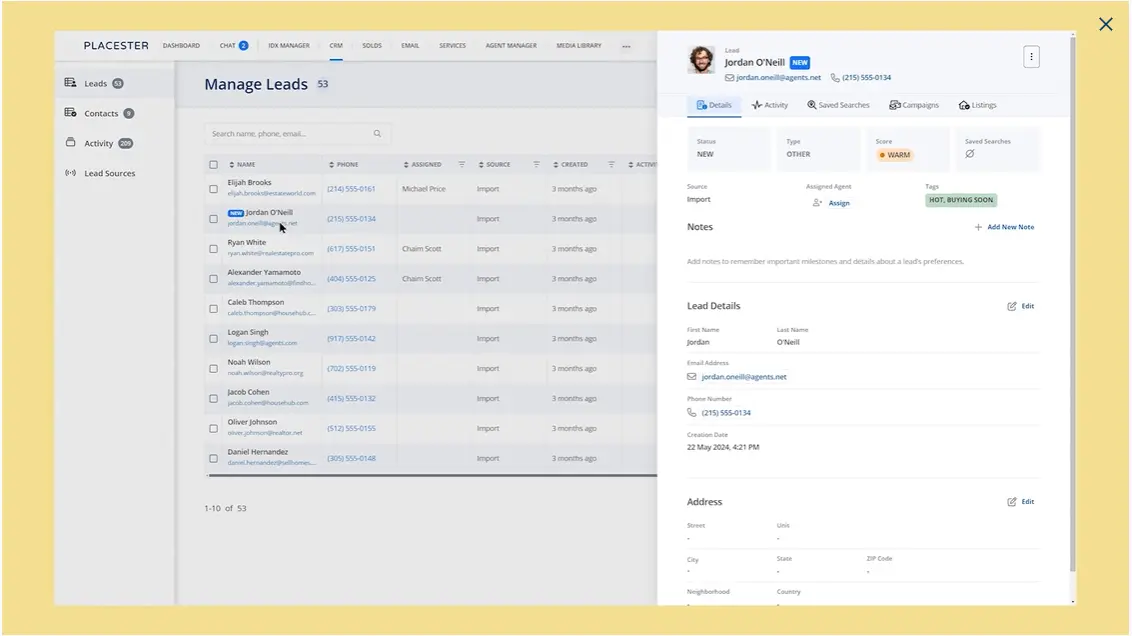
Placester sits in a slightly different category than traditional real estate CRMs. It combines a website builder, lead generation tools, and basic CRM into one platform. That makes it especially relevant if your workflow starts from your website. Instead of plugging multiple systems together, you build your online presence while capturing and managing leads in the same place.
This means your CRM layer is tightly connected to how you attract traffic. When someone browses listings or fills out a form, that activity feeds directly into your pipeline. Placester focuses on making this flow simple and accessible, particularly for agents who don’t want to manage separate systems or deal with technical setup. At the same time, its CRM capabilities are more lightweight compared to standalone platforms, which reflects its strong focus on website-driven lead generation.
Placester key features:
- No-code website builder: creates and manages real estate websites without technical setup.
- IDX/MLS integration: displays live property listings directly on your website.
- Lead capture and management: collects and organizes leads from forms, listings, and landing pages.
- Landing pages and lead generation tools: support targeted pages designed to convert visitors into inquiries.
- Basic CRM functionality: tracks leads, inquiries, and deal progress within the platform.
- Marketing tools: use AI to create blog content, run campaigns, and improve search visibility.
- Automation and task support: helps manage follow-ups and ongoing tasks tied to leads.
- Mobile and collaboration tools: allow communication with support teams and tracking ongoing work.
Placester pros & cons:
| Pros | Cons |
|---|---|
| Strong website + CRM connection that keeps everything in one system | Heavy focus on website builder means CRM features are more basic than dedicated tools |
| Easy to launch and manage without technical skills | Simplified setup limits deeper customization for advanced workflows |
| Built-in IDX and lead generation tools | Designed primarily around inbound leads from your own site |
| Clean, professional templates that support branding | More value for agents starting out than for highly specialized teams |
Placester pricing: $59–$129 monthly or $566–$1,238 annually for agents and $199–$599 monthly or $1,910–$5,750 annually for brokers & teams.
Placester rating: 4.9 / 5 (Google)
👉 Discover all the best real estate website builders.
2. Zoho CRM
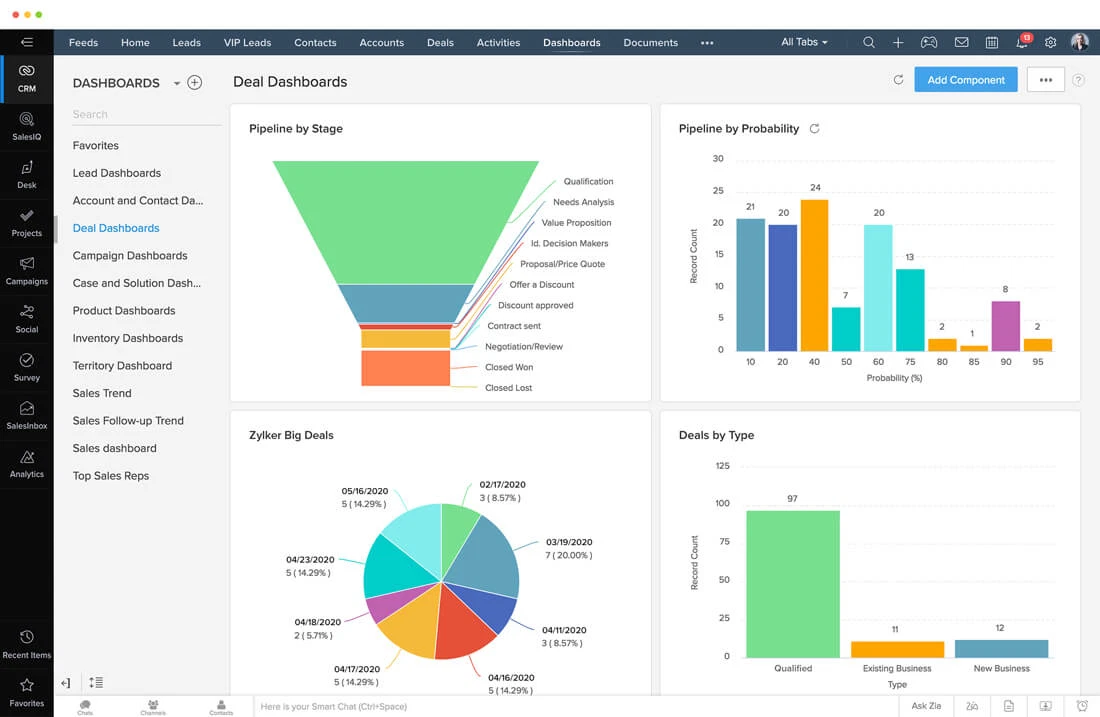
Zoho CRM is a flexible, budget-friendly platform that adapts well to real estate workflows, especially if you need control over how your pipeline is structured. It’s not built exclusively for the real estate industry, but its customization options let you shape it around listings, client stages, and deal progress without switching systems. This makes it a strong fit if you want one central place to manage leads, communication, and transactions.
What stands out is how much you can adjust. You’re not locked into a predefined structure, which gives you room to reflect on how your business really runs. At the same time, this flexibility comes with a trade-off. The system takes time to configure, and the interface can feel overwhelming at the start, especially if you don’t have a clear process in place.
Zoho CRM key features:
- Lead and contact management: centralizes client data and interaction history.
- Customizable sales pipelines: adapt deal stages to your workflow.
- Workflow automation: handles follow-ups and routine actions automatically.
- Multichannel communication tracking: captures conversations across email, calls, and social.
- AI assistant (Zia): analyzes data to prioritize leads and suggest next steps.
- Reporting and analytics: track performance and pipeline progress through data insights.
- Marketing automation: runs and manages marketing campaigns within the system.
- Integrations ecosystem: connects with Zoho tools and external platforms.
Zoho CRM pros & cons:
| Pros | Cons |
|---|---|
| Strong customization options that let you tailor the CRM to your workflow | Steep learning curve during setup and onboarding |
| Affordable pricing compared to many competitors | Interface can feel cluttered or overwhelming at first |
| Solid automation features that improve productivity | Advanced configuration can require time and technical understanding |
| Wide range of integrations and ecosystem tools | Occasional issues with integrations and usability quirks |
Zoho CRM pricing: $14–$52 per user/month (billed annually) or $20–$65 per user/month (billed monthly), with a free plan available.
Zoho CRM rating: 4.1 / 5 (G2)
3. Real Geeks
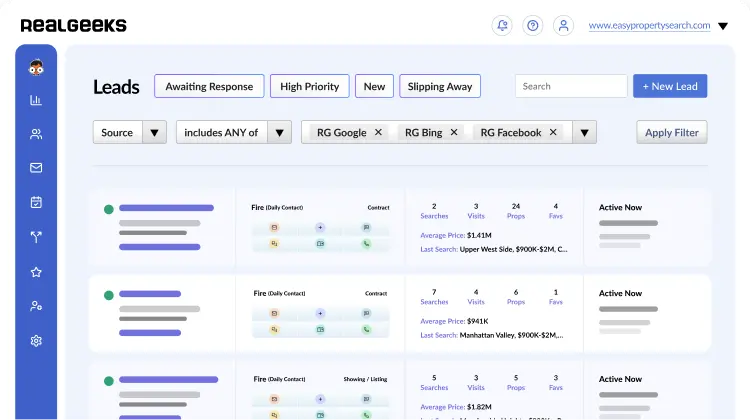
Real Geeks combines an IDX website, CRM, automation tools, and marketing features. This makes it especially relevant if you want to capture leads online and move them through a structured pipeline without stitching together multiple products.
Real Geeks focuses on turning website traffic into active conversations and keeping those leads moving through consistent follow-up. It works best if your growth depends on inbound leads rather than a standalone CRM setup. Reviews reflect that experience—users highlight ease of use and strong lead management, while noting a learning curve and occasional performance issues.
Real Geeks key features:
- Lead Manager CRM: organizes leads, conversations, and follow-up activity in one place.
- IDX website integration: connects your CRM directly to a real estate website built to capture and convert traffic.
- Lead behavior tracking: surfaces real-time activity so you can see which leads need attention first.
- Drip workflows: automate timed texts, emails, and videos for lead nurturing.
- SMS autoresponders: send automatic text replies when new leads come in.
- Built-in dialer: lets you place calls, log outcomes, and set next tasks without leaving the CRM.
- Property valuation tools: support seller lead generation through home value capture tools.
- Marketing Studio: creates postcards, flyers, social posts, and other promotional assets from inside the platform.
Real Geeks pros & cons:
| Pros | Cons |
|---|---|
| Easy-to-use interface that feels clean and manageable for daily work | Some users say parts of the platform take time to learn and may require training |
| Strong lead organization and follow-up structure inside the CRM | A few reviewers report slower performance and a less intuitive experience in some areas |
| Automation tools help keep outreach moving without constant manual work | Pricing is not publicly available, which makes early comparison less transparent |
| Works especially well for website-led lead generation and MLS-connected search | Some review feedback mentions billing and cancellation friction |
Real Geeks pricing: Establish, Grow, Expand, and Conquer plans available, with pricing provided on request.
Real Geeks rating: 4.5 / 5 (G2)
4. Pipedrive
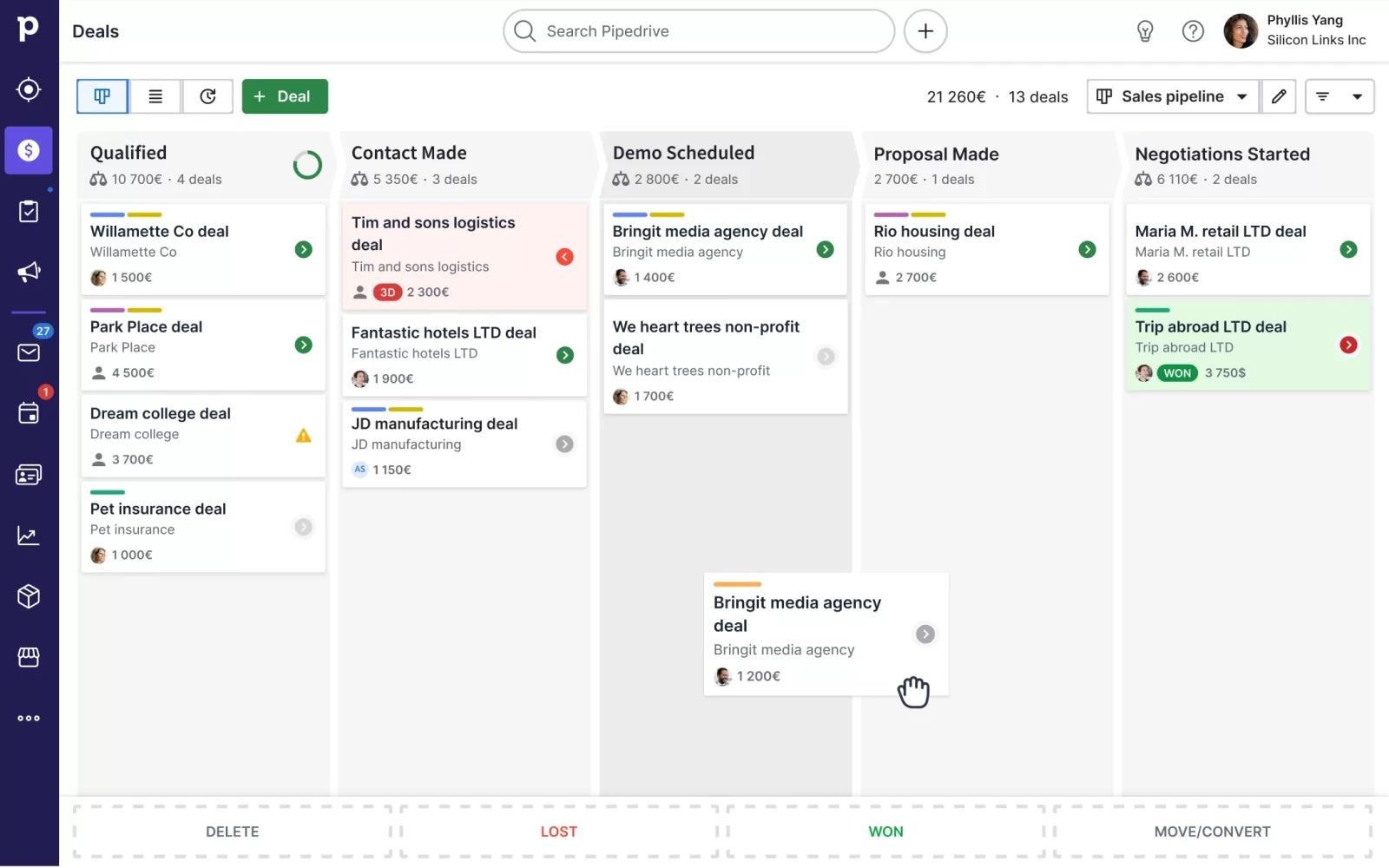
Pipedrive is a sales-focused CRM built around one core idea: you should always see where your deals stand and what to do next. It’s not designed specifically for real estate, but its visual pipeline and flexible structure make it easy to adapt to property deals.
With Pipedrive, you can track buyers and sellers, follow deal progress, and keep conversations moving without losing context. The platform leans toward simplicity and speed, which is why many real estate agents use it as a core system and connect other tools around it. At the same time, it doesn’t come with built-in industry features like MLS or listing management, so you need to shape it to your workflow or extend it with integrations.
Pipedrive key features:
- Visual sales pipeline: tracks deals through stages with a drag-and-drop interface.
- Lead and contact management: centralizes client data, including contact information and interaction history.
- Workflow automation: automates follow-ups and repetitive sales actions.
- Email integration and tracking: syncs inbox and tracks engagement with messages.
- AI sales assistant: provides insights, suggestions, and deal prioritization.
- Reporting and forecasting: tracks pipeline performance and expected revenue.
- Custom pipelines and fields: adapt the system to your sales process.
- Mobile CRM: keeps deal tracking and updates accessible on the go.
Pipedrive pros & cons:
| Pros | Cons |
|---|---|
| Very intuitive interface that makes pipeline tracking easy to follow | Strong focus on sales pipeline means fewer built-in real estate features like MLS or listing tools |
| Visual pipeline gives clear control over deals and next actions | Marketing automation is limited and often requires add-ons or integrations |
| Quick setup with minimal technical overhead | Advanced reporting and analytics could be more developed |
| Strong automation and integrations improve workflow efficiency | Some features, like chatbots or lead tools, come as paid add-ons |
Pipedrive pricing: $14–$79 per seat/month (billed annually) or $24–$99 per seat/month (billed monthly), with free trial available.
Pipedrive rating: 4.5 / 5 (Capterra)
5. Wise Agent
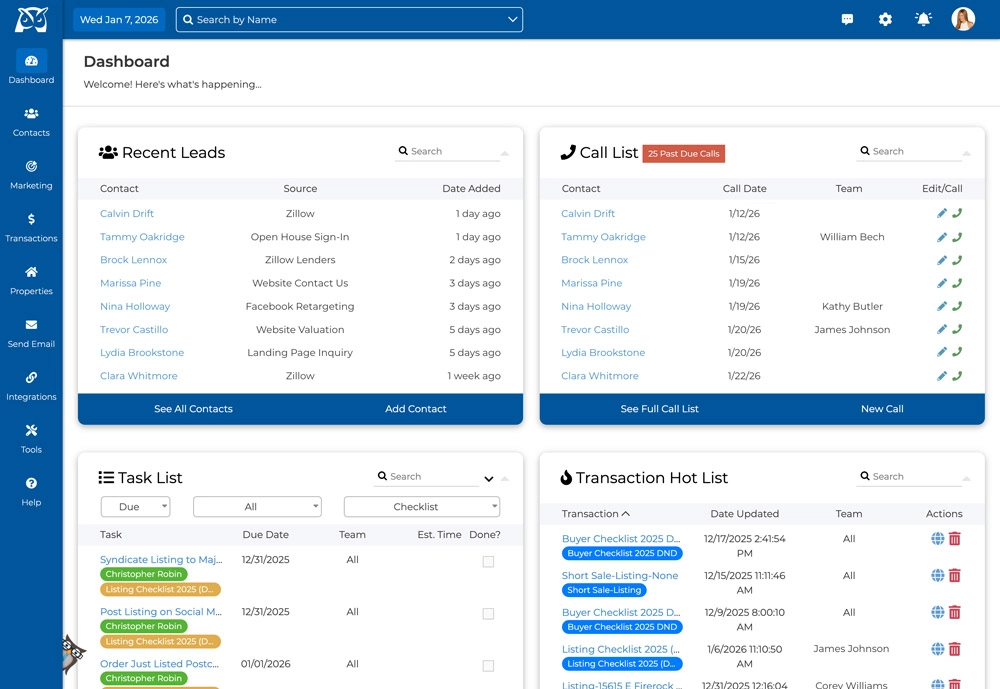
Wise Agent is real estate CRM software designed to cover the full day-to-day workflow of an agent, from lead tracking to transaction management and ongoing follow-up. It positions itself as an all-in-one system, which means you don’t need to rely on multiple tools to manage contacts, marketing, and deals.
What makes it stand out is its balance between functionality and simplicity. The platform helps real estate agents stay organized and consistent with follow-ups, which is where most deals are won or lost. Reviews consistently point to ease of use and affordability as key strengths, though the interface and some features feel less modern compared to newer tools.
Wise Agent key features:
- Contact and lead management: centralizes client data and interaction history.
- Transaction management: tracks deals from initial contact through closing.
- Drip campaigns and marketing automation: handle ongoing email and text follow-up.
- Task management and reminders: keep daily activities and follow-ups on schedule.
- Calendar and day planner: organizes appointments and deadlines in one place.
- Email and communication tracking: logs conversations directly into contact records.
- Landing pages and lead generation tools: capture new inquiries through customizable pages.
- Reporting and commission tracking: monitors performance and deal outcomes.
Wise Agent pros & cons:
| Pros | Cons |
|---|---|
| Easy to use and quick to set up, even for non-technical users | Simpler interface reflects a more traditional design that may feel outdated |
| Strong value for money compared to many real estate CRMs | Limited customization compared to more complex platforms |
| All-in-one approach reduces the need for multiple tools | Some advanced features require add-ons or external tools |
| Reliable follow-up and marketing features support consistent outreach | Occasional usability friction in specific features like contact entry or editing |
Wise Agent pricing: $49/month or $499/year, with a free trial available.
Wise Agent rating: 4.4 / 5 (Capterra)
6. Lone Wolf Technologies
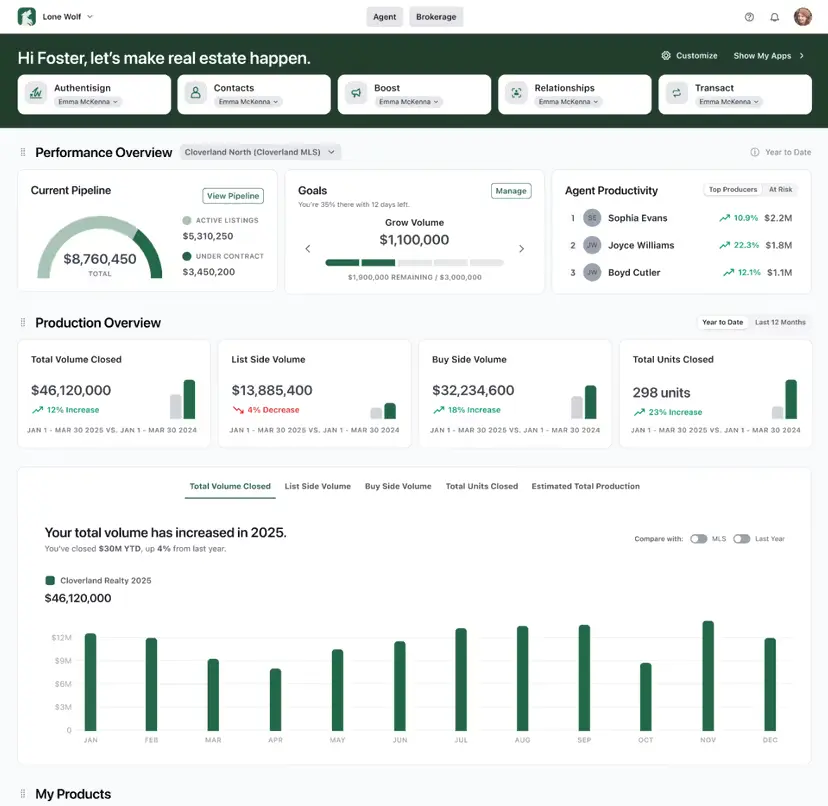
Lone Wolf is a great example of CRM software for real estate brokers. They deal with agents, transactions, compliance, and commissions—all moving at the same time. The platform is built with that reality in mind. Instead of focusing only on individual pipelines, it gives you a system that keeps the entire brokerage operation structured.
Lone Wolf brings structure to things that usually live outside a typical CRM, like compliance workflows, commission tracking, and brokerage-level reporting. You can standardize how deals are handled across your team, from required documents to approval steps, so every transaction follows the same process. It becomes especially useful when you want to reduce manual oversight.
Lone Wolf key features:
- Contact and lead management: stores and updates client details as relationships develop.
- Workflow automation: handles follow-ups, reminders, and ongoing tasks.
- AI-powered messaging: supports email writing and personalized outreach.
- Unified communication hub: manages email and SMS conversations in one place.
- Transaction management integration: connects CRM activity with deals from contract to close.
- Document and compliance tools: keep contracts, forms, and records organized.
- Reporting and analytics: track performance across agents and pipeline stages.
- Lead generation tools (Leads+): capture and qualify new seller opportunities.
Lone Wolf pros & cons:
| Pros | Cons |
|---|---|
| Covers the entire real estate workflow from lead to closing in one system | Designed as a full platform, which makes it heavier than standalone CRMs for simple use cases |
| Strong transaction and back-office integration improves operational control | Setup and onboarding can take time, especially for larger teams |
| Good value for feature depth at scale, especially for brokerages | Interface and customization can feel less modern or flexible in some areas |
| Reliable reporting and commission tracking for real estate operations | Customer support and performance feedback varies depending on product and setup |
Lone Wolf pricing: Available on request
Lone Wolf rating: n/a
7. Follow Up Boss
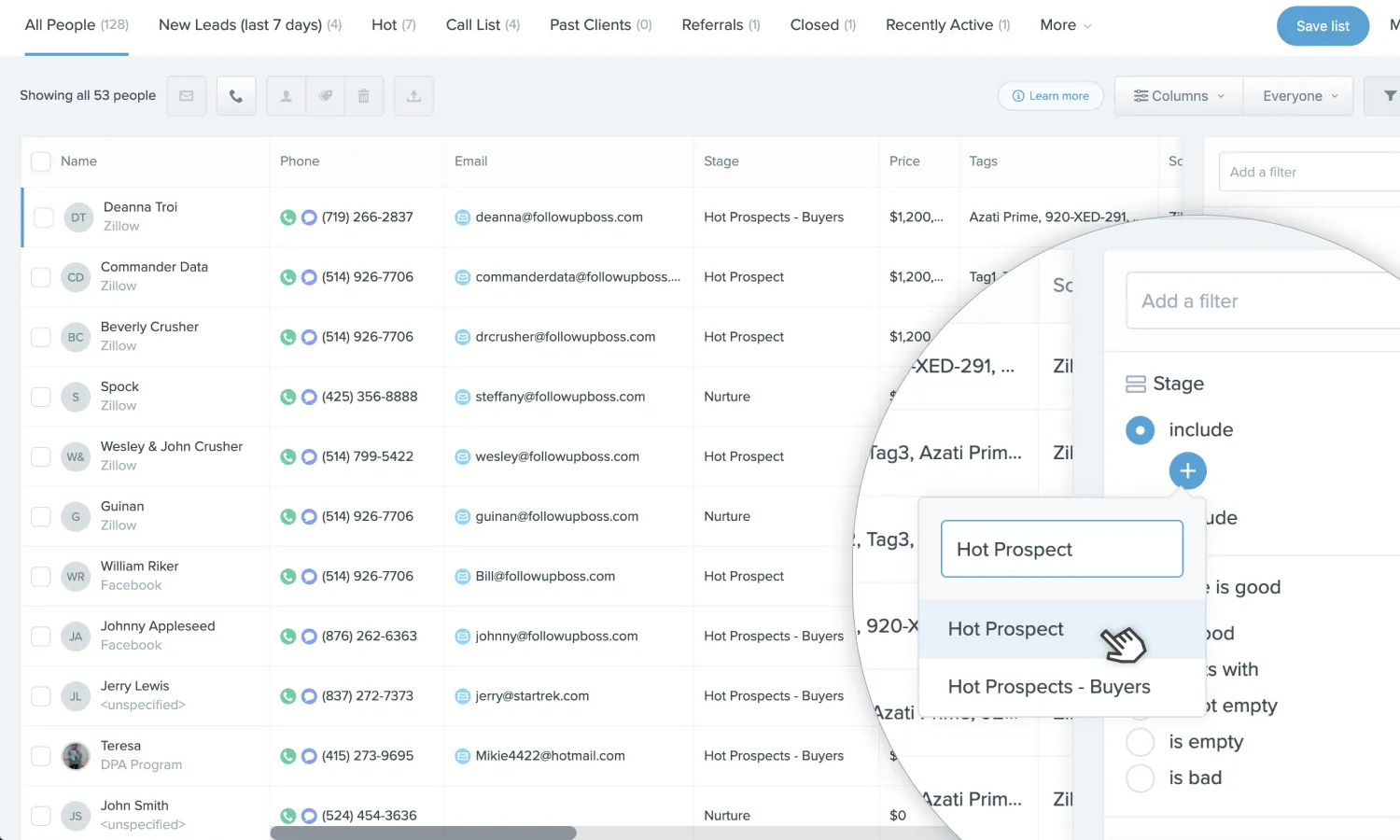
A new lead comes in, and the clock starts. If you don’t respond quickly, someone else will. Follow Up Boss is built for that moment. It gathers incoming leads into one place and keeps every message tied to the same conversation, so you can reply without searching for context or switching tools.
As you work through your day, everything flows through a single stream of activity. You see who reached out, what they did, and where the conversation stands. The system stays focused on keeping communication fast and consistent, which is why it’s often chosen by agents who depend on online lead flow. Users point to that clarity and speed as the main strengths, while noting that the platform keeps its scope tight and doesn’t extend as deeply into transaction management.
Follow Up Boss key features:
- Lead management: pulls leads from multiple sources into one system.
- Communication hub: centralizes email, calls, and texts in one inbox.
- Automated follow-ups: run drip campaigns and task sequences automatically.
- Lead distribution: assigns incoming leads across agents and teams.
- Pipeline tracking: tracks deal progress and client status.
- Email and text tracking: monitors engagement and responses.
- Integrations ecosystem: connects with lead sources like Zillow and Realtor.com.
- Mobile CRM: keeps communication and updates accessible on the go.
Follow Up Boss pros & cons:
| Pros | Cons |
|---|---|
| Very easy to use and quick to learn according to users | Pricing is higher than many real estate CRMs |
| Strong automation that improves follow-up consistency | No built-in transaction management features |
| Excellent integrations with lead sources and tools | Some teams don’t use full potential without setup effort |
| High user satisfaction (~4.5–4.6 rating across platforms) | Limited beyond communication-focused workflows |
Follow Up Boss pricing: $58–$833 per month (billed annually) or $69–$1000 per month (billed monthly), with additional fees for extra users.
Follow Up Boss rating: 4.6 / 5 (Capterra)
👉 Discover the complete guide to real estate lead generation.
8. HubSpot CRM
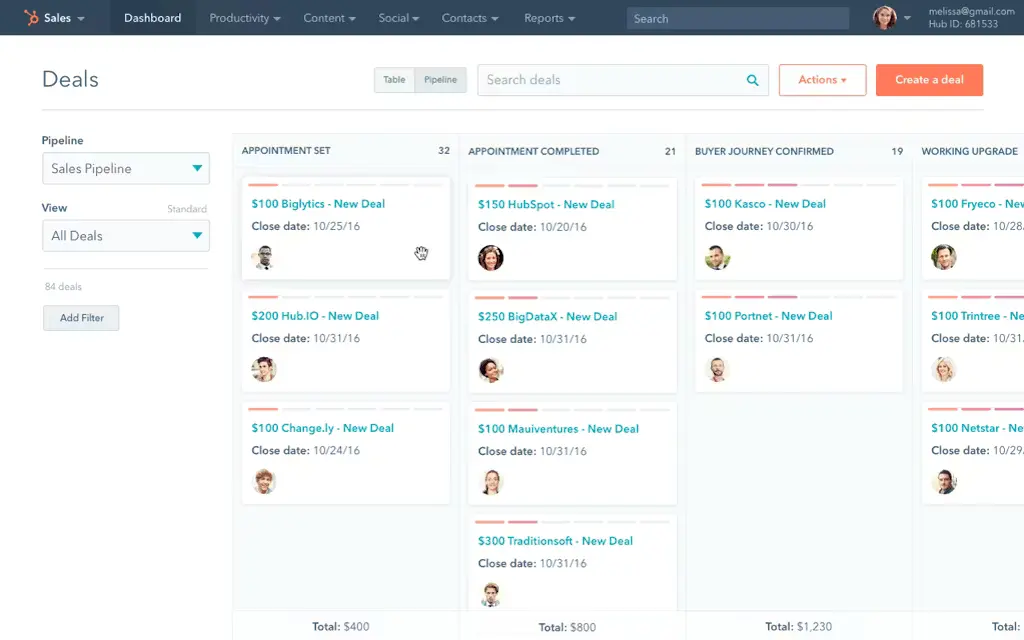
You open your CRM, and instead of jumping between tabs, tools, and inboxes, everything is already there. A lead comes in, you see the full context, and the next step is obvious. That’s the feeling HubSpot builds around. It doesn’t try to act like niche real estate lead generation software. It gives you a system where marketing, sales, and communication sit in one flow, so you don’t lose momentum between stages.
For real estate, that changes how you manage relationships over time. Deals don’t end at closing, and HubSpot leans into that. It keeps client history, follow-ups, and future opportunities tied together, which makes it easier to stay relevant long after the transaction.
HubSpot CRM key features:
- Contact database: keeps all client data and activity in one place.
- Lead capture and tracking: collects and organizes incoming inquiries automatically.
- Sales pipeline management: tracks deals through customizable stages.
- Email tracking and automation: monitors engagement and runs follow-ups.
- Workflow automation: automates tasks, lead routing, and communication.
- AI tools (Breeze): support content, insights, and decision-making.
- Reporting and analytics: track performance across pipeline and campaigns.
- Marketing tools: run campaigns and manages audience segmentation.
HubSpot CRM pros & cons:
| Pros | Cons |
|---|---|
| Very easy to use with a clean, intuitive interface | Advanced features locked behind higher-tier plans |
| Strong integrations with tools like Gmail, Outlook, and Slack | Pricing increases quickly as you scale features |
| Powerful automation and centralized data improve productivity | Learning curve for more complex setups |
| Free plan is robust enough to start and test the system | Some users report occasional bugs or limitations |
HubSpot CRM pricing: Free plan available, with paid plans starting at $9–$15/seat/month and scaling significantly for advanced features and enterprise-level tools.
HubSpot CRM rating: 4.4 / 5 (G2)
9. Ixact Contact
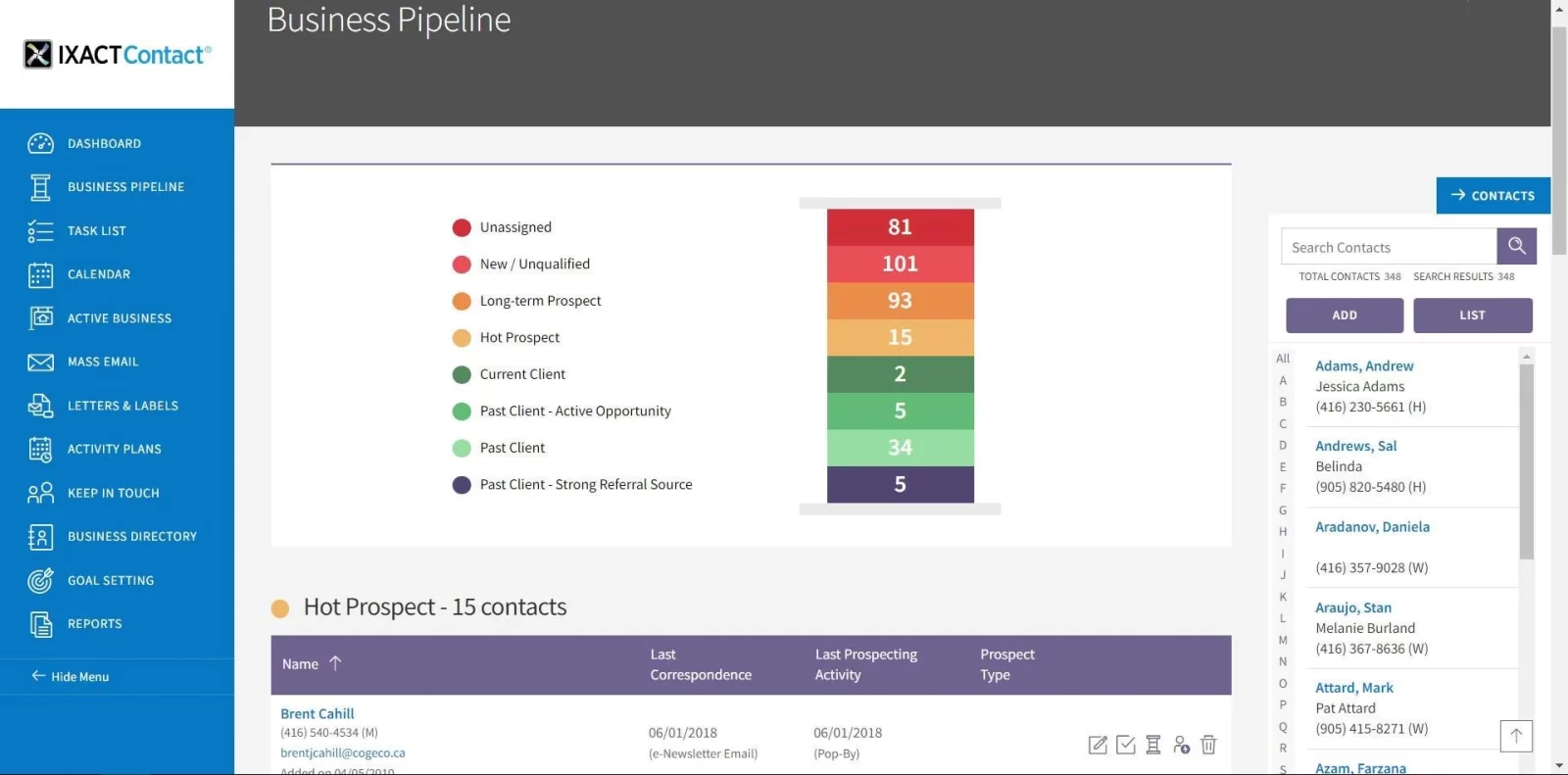
You don’t always need another tool. Sometimes you need something that keeps you in touch with people without forcing you to think about it all day. Ixact Contact is a residential real estate CRM built around maintaining relationships over time, not just handling new leads. That’s why it often feels closer to a personal assistant than a traditional management software.
You set things up once, and the system keeps working in the background. It reminds you who to reach out to, sends content that keeps you visible, and helps you stay present in your clients’ lives without constant effort. That approach shows up in reviews as well—agents highlight how easy it is to stay consistent with follow-ups and communication, even when business gets busy.
Ixact Contact key features:
- Contact management: stores detailed client profiles with history and activity.
- Lead capture: pulls new inquiries into a centralized database.
- Keep-in-touch system: suggests daily follow-ups based on client relationships.
- Email marketing: runs pre-written newsletters and drip campaigns.
- Task and calendar management: keeps follow-ups and appointments on track.
- Pipeline tracking: shows deal progress and upcoming actions.
- Website and lead generation tools: support online presence and inbound leads.
- Automation workflows: handle repetitive communication and reminders.
Ixact Contact pros & cons:
| Pros | Cons |
|---|---|
| Very easy to use and quick to learn for most agents | Limited customization compared to more advanced CRMs |
| Strong built-in marketing content that saves time | Some features like texting or advanced tools require add-ons |
| Helps maintain consistent client communication over time | Interface and flexibility can feel basic for larger teams |
| Good value for money according to user feedback | Certain areas like integrations or data import can be limited |
Ixact Contact pricing: $46.75 per month (billed annually), with free trial available.
Ixact Contact rating: 4.5 / 5 (G2)
10. Buildout
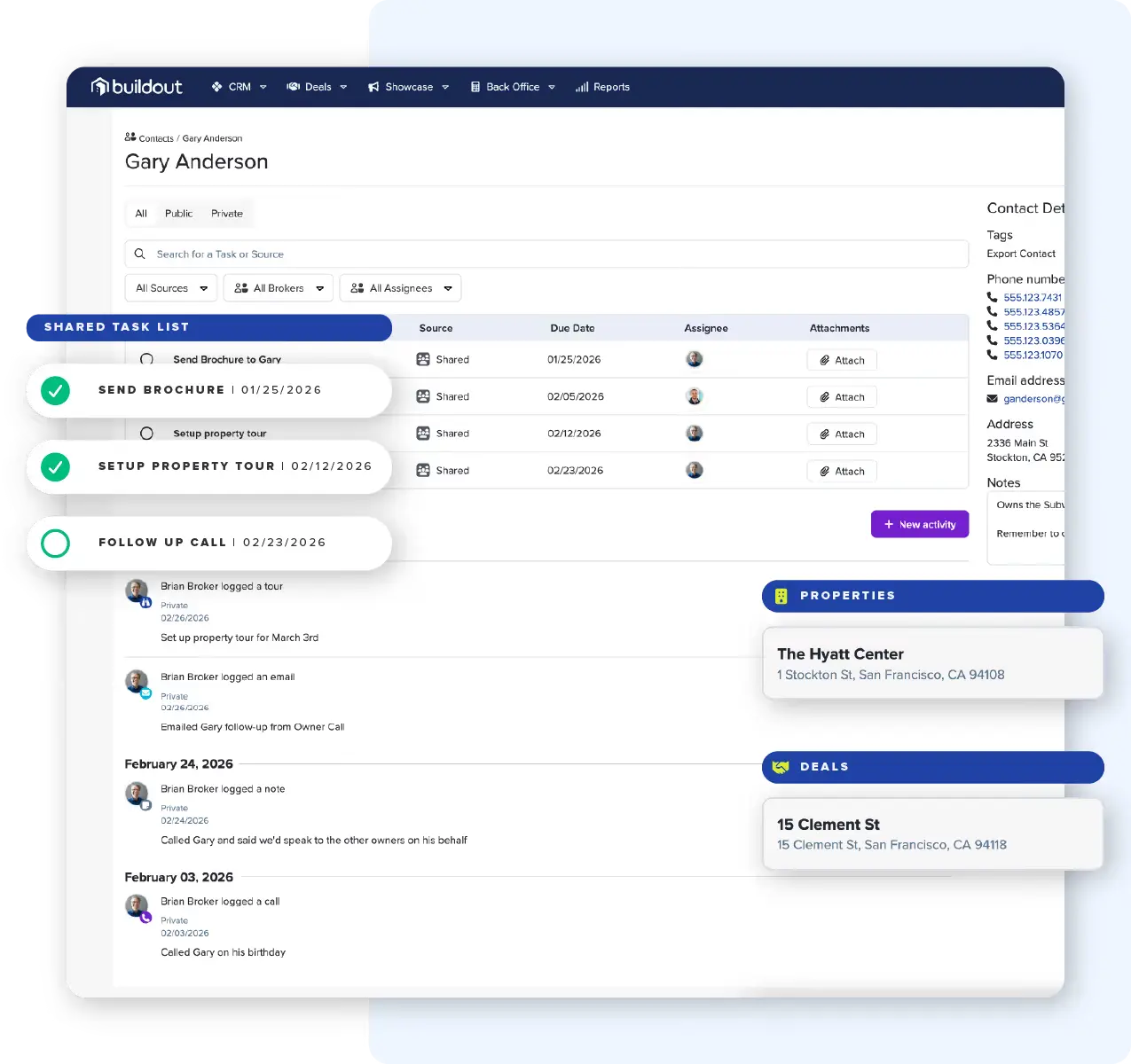
You’re preparing a listing pitch. You need comps, a polished OM, a property website, and outreach ready before someone else wins the assignment. In most setups, that means jumping between tools, copying data, and hoping nothing breaks along the way. Buildout approaches that moment differently. You enter the data once, and it carries forward into everything—marketing, CRM, deal tracking—without rework.
This commercial real estate CRM software is built around listings and deal execution, not just contacts. When a property moves from prospecting to marketing to closing, the system keeps the same data alive across every step. That’s why it’s often used by brokerages handling multiple listings and stakeholders at once.
Buildout key features:
- Deal and pipeline management: tracks deals from prospecting through closing in one flow.
- Property and listing database: stores and structures commercial property data for reuse across workflows.
- Marketing automation (OMs, proposals, websites): generates listing materials and property sites from the same dataset.
- Prospecting and data intelligence: surfaces property owners and opportunities based on CRE data.
- Relationships and contact management: tracks leads activity and deal context in one system.
- Transaction and commission tracking: manages commission splits and payouts within the brokerage.
- AI-assisted workflows: automate tasks like proposal generation, outreach, and follow-up tracking.
- Reporting and brokerage analytics: provide pipeline and revenue insights across the team.
Buildout pros & cons:
| Pros | Cons |
|---|---|
| Built specifically for commercial real estate workflows | Editing workflows can require extra steps when updating property data |
| Strong marketing engine that speeds up listing creation and promotion | Setup and configuration may take time depending on workflow complexity |
| Keeps data consistent across CRM, marketing, and deal execution | Limited flexibility if you prefer fully custom-built workflows |
| Works well for brokerages handling listings end-to-end in one system | Best suited for CRE, less relevant for residential use cases |
Buildout pricing: Plans starting at $125 /user/month.
Buildout rating: 4.9 / 5 (based on 10 Capterra reviews)
Save time and stay on top of every lead with your CRM platform
A CRM can help real estate professionals manage leads and clients in a way that keeps every conversation connected and every deal moving. The real advantage shows up over time. When your follow-up stays consistent, and your pipeline stays structured, you naturally foster stronger relationships and close more deals without chaos.
If you’re just getting started, you don’t need the most advanced system on the market. Placester gives you a simpler entry point, with basic CRM features that help every real estate agent focus their efforts on growing the business instead of spending time on manual management. Its strength lies in how quickly you can launch and grow a website with AI support. This makes it a practical choice when your priority is visibility and lead generation, not complex CRM workflows.
FAQ
What is CRM software in real estate?
CRM software in real estate is a system that helps you manage leads and deals. It stores conversations, preferences, and activity in one place, so you always have context when you follow up. Instead of relying on memory or scattered tools, you work from a structured pipeline that reflects your actual business.
Do I need CRM software for real estate?
If you handle more than a few active leads at once, you need a CRM to stay consistent and avoid missed opportunities. Real estate depends on timing and follow-up, and manual tracking breaks down as volume grows. A CRM keeps your outreach organized and helps you focus on the contacts most likely to convert.
What CRM do real estate agents use?
Agents typically choose platforms built for real estate workflows, such as Follow Up Boss, BoldTrail, LionDesk (Lone Wolf), Wise Agent, or Placester. These tools combine lead management, automation, and client communication tracking in one system. The right choice depends on how you generate leads and how much control you want over automation.
Is there any free real estate CRM software?
Yes, some CRMs offer free plans, with HubSpot CRM being the most widely used option. It covers basic contact management, deal tracking, and email tools, which can be enough when you’re just getting started. As your pipeline grows, you’ll likely need paid features to handle automation and integrations.
What are the 4 types of CRM software?
CRM systems are usually grouped into operational, analytical, collaborative, and strategic categories. Operational CRMs handle day-to-day sales and automation, while analytical ones focus on data and performance insights. Collaborative CRMs improve information flow across teams, and strategic CRMs help you plan long-term relationship management and growth.
Published on

Take your real estate website to the next level with Placester!
Discover new opportunities and save thousands of dollars every year.