(800) 728 8391


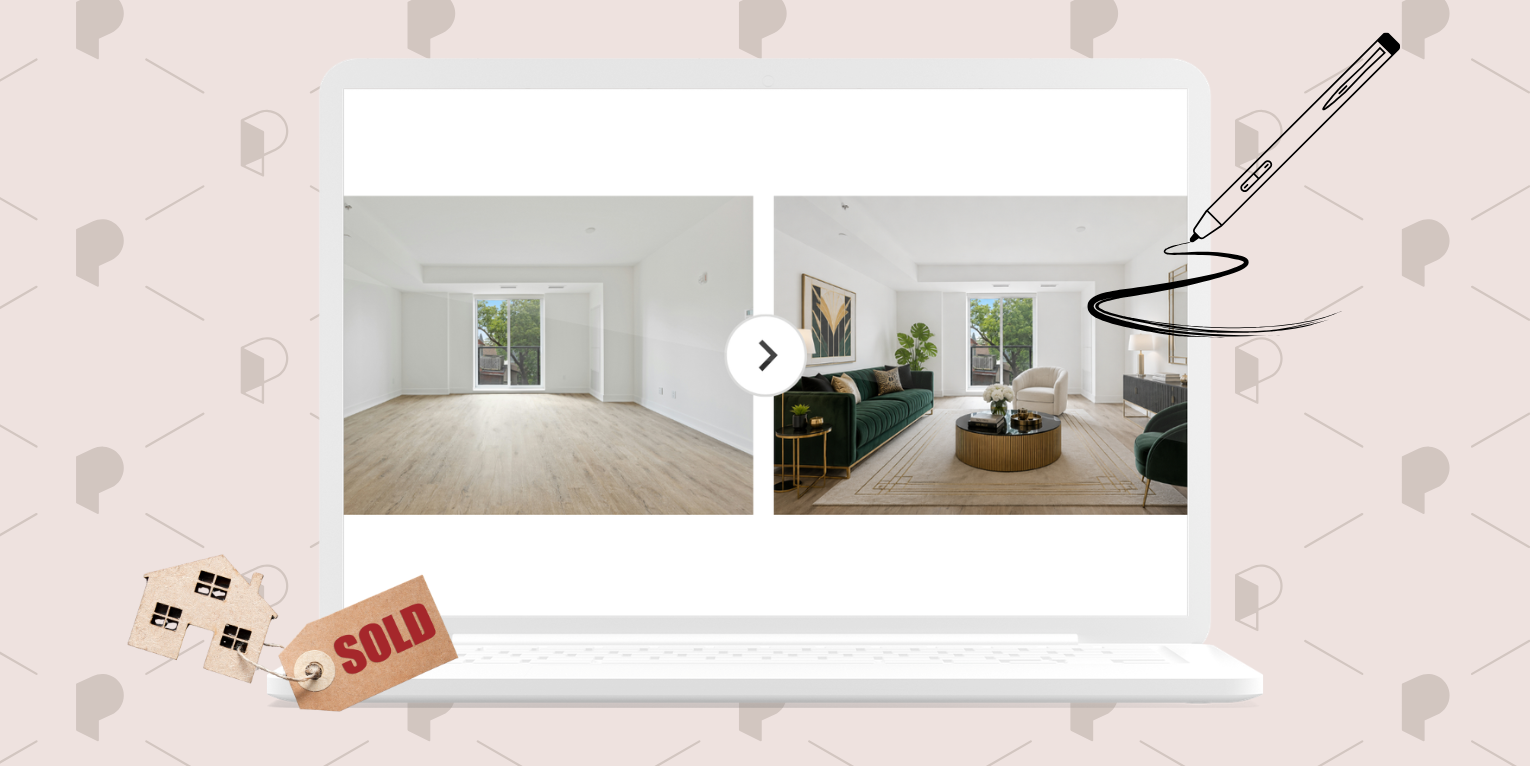
Quick summary:
- Staging is a popular method for helping buyers visualize a property as their future home, with the best virtual home staging software reducing listings’ time on market (according to 49% agents surveyed by NAR).
- Good virtual staging tools all have a few things in common: they produce realistic, high-quality images, preserve the apartment’s original layout, and are easy to use even for people without graphic design experience.
- When choosing the right platform, start by identifying your needs. If you stage properties regularly, a subscription AI tool such as REimagineHome may offer the best value, while more occasional users should aim for pay-per-image services.
A cold and empty room vs a warm and cozy home with a whimsical rug in the living room and a painting by a trendy artist in the bedroom.
Which one would speak to you more?
For most people, it will probably be the latter, which is why virtual staging is such a fast-growing market in the real estate industry.
Furnished properties make people emotionally connect with a space, better understand its potential, and, of course, imagine themselves living there.
In fact, potential buyers spend around 70% more time watching staged listings vs. unstaged ones online.
But…
- What does staging mean exactly?
- How does a virtual staging tool work?
- Can you use AI only, or do you need a human designer for good results?
- What are the best virtual staging apps for realtors?
Read on to find out everything you need to know about virtual staging software, including our comparison of the top picks (AI & human-powered)!
What is virtual staging software?
Virtual staging software is a tool that lets you digitally furnish and decorate empty properties.
Let’s say you’re trying to sell an apartment.
When you present it as an empty space, it can look cold, small, uninviting—just difficult to imagine as an actual home to live in. But add some furniture, maybe a few cozy items to make the apartment feel more lived-in, and you get a home where a potential buyer can actually envision their future life in.
Of course, doing that physically, as in bringing in sofas, tables, lamps, and plants, is time-consuming, expensive, and not always worth it (more on that later).
That’s why it’s so much simpler and cheaper to just use virtual staging software.
The software is usually ready to use in the form of an app or a website, where you can upload the photo of your property and get a realistic-looking version of the room with furniture and decor added digitally.
Modern digital tools can be run exclusively by AI or used by human designers.
And they really work.
According to the National Association of Realtors (NAR), nearly half (49%) of real estate agents said that staging reduced the time on market of their listings.
💡 Read more about current real estate trends!
Virtual staging vs physical staging – key differences
Both virtual staging and physical staging aim to make a property more attractive to potential buyers, but they achieve this in different ways.
VIRTUAL STAGING: uses software to digitally add furniture, décor, and accessories to photos of empty rooms.
No physical changes are made to the property, and the staged images exist only online. This approach is fast, convenient, and typically costs a fraction of the cost of traditional staging—in fact, virtual staging costs around 95% less than physical.
✅ Cheap
✅ Fast
✅ Used mostly for marketing listing photos
PHYSICAL STAGING: involves bringing real furniture and decorations into the property. Buyers can see the staged rooms during in-person viewings, which can create a stronger emotional connection and a more immersive experience.
✅ More accuracy
✅ First-hand experience for buyers
✅ Common in luxury properties and more competitive markets
What to look for in a virtual staging platform? X essential features
What makes a virtual staging app good depends on a real estate agent and their needs, but there are obviously some standards that most people will look for—such as image quality or MLS compliance.
Below, we’re listing the most important ones.
📸 Image quality and realism
Obviously, this goes to the top of our list.
The whole purpose of virtual staging is to create professional-quality listing photos that help market properties more effectively.
Whether you’re working with photos of empty rooms or partially furnished spaces, the software should generate images that look realistic and believable. Poor-quality staging with distorted furniture, strange shadows, or inaccurate proportions can hurt a property’s appeal rather than boost sales.
The best tools create market-ready, move-in-ready visuals that help buyers imagine themselves living in the space.
🎨 Variety of design styles
A good virtual staging platform should offer a wide range of design style options.
Different buyers respond to different aesthetics, so the ability to choose between Modern, Scandinavian, Luxury, Industrial, Art Deco, or Minimalist interiors can help you find the right presentation for a property.
Some of the top staging & marketing tools even allow users to test multiple styles on the same image to determine which approach best aligns with a buyer’s expectations.
🛋️ Furniture placement and room accuracy
Virtual staging isn’t just about adding furniture.
The software should understand room dimensions and perspective so that furniture appears naturally scaled and properly positioned. This is especially important for agents who want listing photos that accurately represent the property.
The best solutions preserve architectural details while helping transform listings into visually appealing spaces, which is so far the strongest argument for why it’s best to rely on human (professional) stagers rather than AI.
💡Learn more about how to use AI as a real estate agent.
⚡ Ease of use
Not everyone using virtual staging software is a designer.
A simple workflow can help you find quality results faster and get you started within minutes. Most modern platforms allow users to upload photos, select a style, and generate images automatically.
Some solutions also include a drag-and-drop editor for users who want greater control over furniture placement and décor choices.
💰 Pricing and value for money
Pricing structures vary a lot between platforms.
Some charge on a per-image basis, while others use subscriptions or credit systems. If you only need to stage a handful of properties, a per-image model may provide better value for money.
Agencies and real estate teams handling multiple listings often benefit from subscription plans that reduce costs over time and deliver results at a fraction of the cost of traditional staging.
🏠 Additional features
Many modern platforms go beyond virtual staging.
Features such as item removal, virtual renovation, furniture replacement, image enhancement, and even 360-degree virtual tour can significantly expand the usefulness of the software.
If you frequently want to remove clutter or showcase renovation possibilities, these capabilities can eliminate the need for additional tools.
🆓 Free trials and testing options
Before committing to a paid plan, it’s worth testing the software yourself.
Free trials and sample credits help you compare image quality and overall performance. They are also a great way to explore different strategies for new listings and discover which platform works best for you and the way you work.
Comparison methodology: how we compared virtual staging tools?
To identify the best apps, I tried to find a balance between price, image quality, and ease of use.
In short—what’s the cheapest tool that you can use without being a professional graphic designer to get a high-quality image that doesn’t sacrifice accuracy or attention to architectural detail?
Each platform was visited and scrutinized in terms of its features, interface, and intuitiveness. Where available, I also considered user reviews found on portals such as Trustpilot, Google, or Reddit to see if they overlap with my initial impressions.
Here’s a comprehensive list of factors that were used to compare the virtual staging software in this article:
- AI or human-based,
- price,
- payment model,
- image quality,
- intuitiveness of use,
- turnaround time,
- customization options,
- MLS compliance,
- free options availability,
- additional features,
- suitability for beginners,
- user reviews and reputation,
- scalability for agencies and high-volume users.
While not all of the tools were available for a free one-off trial, a deep and close analysis of those features gave me a pretty good picture of each platform’s capabilities and—perhaps even more importantly—the audience they’re best suited for.
What is the best virtual staging software? Top 9 tools compared
For the sake of this comparison, I decided to divide the virtual staging software into three categories: AI stagers, professional (human), and AI generation tools (LLMs will be discussed later).
Below, you’ll find a short description of the best apps/tools that can be assigned to these categories, with a top choice for each.
Category 1: AI-powered virtual staging
AI Virtual Staging

AI Virtual Staging is a very popular AI-powered virtual staging platform designed primarily for real estate agents, photographers, and property marketers.
The platform is super easy to use—all you have to do is upload a photo of an empty space you want to stage and choose the interior style you’re interested in.
Pricing comes in three packages:
- Starter: $19 for 10 images ($1.90 per image)
- Standard: $49 ($1.63 per image)
- Pro: $99 ($0.99 per image)
All plans are one-time purchases with no recurring charges, and all of them are processed at the same speed (no delays for larger packages). The images generated are MLS-ready, with resolution varying depending on the price.
As for some drawbacks…
While AI staging apps are obviously very fast and very cheap, they do run into problems with furniture scaling, object placement, and realism when compared to human designers. Users also tend to complain about the lack of creativity and polish in the stagings.
Estate Reimagine

Rendair
When it comes to AI, Rendair is where it gets a little more interesting and less basic.
Unlike most, this app focuses not only on furnishing empty rooms but also offers a broader suite of capabilities, including AI rendering, virtual staging, image editing, floor-plan-to-render conversion, sketch-to-render generation, upscaling, and even image-to-video creation.
It’s way more professional and has a broader scope, which is why it’s marketed primarily at architects, interior designers, and real estate professionals.
Rendair’s drawback is that it doesn’t offer one-off services—only subscriptions.
The pricing is as follows:
- Student’s plan: 9,50 EUR per month for 250 image creations
- AI creator plan: 19,00 EUR per month for 500 image creations (and more)
- Pro plan: 49,00 EUR per month for 1500 image creations (and more)
- Team pro plan: 200,00 EUR per month for 7500 image creations (and more)
Best for: Architects, designers, developers, and real estate agents who need more than simple virtual staging and do bulk projects.
| Tool | Pricing | Free Option | User-Friendly | Best For |
| AI Virtual Staging | One-time purchase ($19–99) | No | ⭐⭐⭐⭐⭐ | Fast, affordable staging |
| REimagineHome | Subscription (from ~$19/month) | Yes (5 free images) | ⭐⭐⭐⭐⭐ | Real estate agents |
| Rendair | Subscription (€9.50–200/month) | Limited | ⭐⭐⭐⭐ | Architects & visualization projects |
🥇WINNER: REimagineHome
Category 2: Professional (human) virtual staging
BoxBrownie

BoxBrownie is probably the best-known virtual staging service in the industry.
Unlike with the typical AI-first tools, the photos are staged by human graphic designers (although in 2026, it’s probably not 100% AI-free), which gives you more reassurance about the proportions, measurements, and furniture setting.
The platform is fairly easy to use, with a pay-as-you-go rather than a subscription model. The delivery is very fast too, as it usually occurs within 24-48 hours after submitting a request.
As you can see in the screenshot above, the typical pricing from BoxBrownie is $24 per staged image, although some clients mention slightly higher prices, reaching $30+, depending on complexity.
BoxBrownie is consistently praised for:
– ease of ordering,
– fast delivery,
– accuracy,
– realistic-looking photos (which can be an issue with AI),
– aesthetically pleasing end result.
While some recent reviewers argue that BoxBrownie is getting expensive compared to AI alternatives, it remains one of the most efficient and easy-to-use virtual stagers on the market.
Best for: Realtors who want reliable, professional, non-AI edited images without committing to a monthly plan.
Virtual Staging Solutions (VSS)

Virtual Staging Solutions (VSS) positions itself as a premium, designer-led service.
The company focuses on realistic, high-end staging rather than high-volume, low-cost production. Customer testimonials frequently highlight the realism of the designs and the ease of working with the team.
So, where’s the catch?
Well, the main drawback seems to be the price.
Third-party reviews (from platforms like Trustpilot or Reddit) describe VSS as significantly more expensive than many competitors, making it a better fit for luxury listings than budget-conscious agents (there are also no price lists on their website—you have to contact them for individual pricing).
The ordering process is straightforward, but because the work is handled by designers rather than AI, turnaround times are generally longer than with automated platforms.
Best for: Luxury properties where photo quality matters more than speed or cost.
Styldod

Styldod occupies an interesting middle ground between traditional virtual staging services and newer AI-assisted workflows.
The company offers virtual staging, photo editing, floor plans, and marketing materials for the real estate industry.
Standard pricing starts at $16 per photo with an additional $12 for rapid delivery and +$30 for a video tour of your property.
Real estate agents praise Styldod mostly for its affordability, quick turnaround, and revision-friendly process. Some also claim that the end result is more curated and designer-like compared to pure AI staging.
The visual staging feature (because the platform has more complex ones as well) is very easy to navigate—all you have to do is provide the pic of the interior you want to reimagine and describe your goal.
The price shows up right after filling out the form so you know what you get right off the bat.
Best for: Agents looking for a balance between affordability and quality.
| Tool | Pricing | Turnaround | User-Friendly | Best For |
| BoxBrownie | ~$24–30/image | 24–48 hours | ⭐⭐⭐⭐⭐ | Most real estate listings |
| Virtual Staging Solutions | Custom quote | Usually longer | ⭐⭐⭐⭐ | Luxury properties |
| Styldod | From $16/image | Fast | ⭐⭐⭐⭐⭐ | Budget-conscious agents |
🥇WINNER: BoxBrownie
Category 3: AI image generation tools
Midjourney
Midjourney is a bit of a GOAT when it comes to AI image generators currently available, but it was not built specifically for real estate.
Although capable of producing highly realistic interior design and virtual staging concepts, Midjourney requires text prompts with many technical details for a realistic property photo.
The platform excels at creativity, photorealism, and design inspiration, but it can struggle with preserving exact room layouts and architectural details. For real estate listings, this can be a big limitation because buyers expect an accurate representation of the property.
Achieving professional results wo often requires prompt experimentation and familiarity with image-generation techniques, which may be difficult for a real estate agent who’s not also into graphic design.
Midjourney operates on a subscription model, with plans starting at approximately $10/month (Basic) and increasing to $30/month (Standard) and above for heavier users.
There is currently no permanent free plan.
Best for: Interior design concepts, marketing visuals, and creative inspiration rather than strict real estate staging.
Canva AI
I know what you’re thinking. Canva?
But the thing is, it’s become so extremely popular that people forget it’s actually a very powerful graphic design platform (especially if you go pro).
The free version of Canva AI combines image-generation capabilities with Canva’s broader graphic design platform. Users can generate interiors from text prompts using Magic Media and then edit the results directly within Canva’s design interface.
The results are not as detailed and photorealistic as those produced by specialized AI image generators, but compared to Midjourney, Canva is significantly easier for beginners because it provides a familiar drag-and-drop environment and does not require advanced prompting knowledge.
Canva offers a generous free tier that includes a limited number of AI image generations.
Paid plans start at approximately $15/month for Canva Pro, which unlocks additional AI credits and design features. Reviews consistently praise Canva’s ease of use and accessibility, especially among marketers and small business owners.
For virtual staging specifically, Canva can generate attractive room concepts, but it lacks the accuracy, furniture placement controls, and room-preservation features offered by dedicated staging software.
Best for: Marketers, bloggers, and small businesses that want quick AI-generated interior visuals without learning specialized software.
RoomGPT
No, the name is not a coincidence—RoomGPT is an interior design version of ChatGPT.
Its position among the other tools described in this article is interesting because RoomGPT lands somewhere between dedicated virtual staging software and general AI image generators.
Rather than asking users to write detailed prompts, the platform is specifically designed for room redesign and interior visualization. Users upload a photo of a room, select a style (Modern, Scandinavian, Minimalist, Industrial, etc.), and AI generates a redesigned version of that room.
The experience feels much closer to REimagineHome than to Midjourney.
The platform offers a limited free option and typically uses a credit-based model for additional generations. Pricing is generally lower than that of many professional staging services, making it attractive for casual users and homeowners.
Reviews frequently praise RoomGPT for its simplicity and speed, but image quality can be inconsistent.
Best for: Homeowners, renters, and casual users exploring interior design ideas rather than real estate agents creating listing photos—but worth exploring for free.
| Tool | Pricing | Free Version | User-Friendly | Realism |
| Midjourney | From $10/month | No | ⭐⭐⭐ | ⭐⭐⭐⭐⭐ |
| Canva AI | Free + Pro ($15/month) | Yes | ⭐⭐⭐⭐⭐ | ⭐⭐⭐ |
| RoomGPT | Credit-based | Yes | ⭐⭐⭐⭐⭐ | ⭐⭐⭐⭐ |
🥇WINNER: Midjourney
5 tips for choosing the right virtual staging app
Not sure which of the tools described above would be the best fit for you?
Take a look at these five simple tips that will help you choose the right virtual staging software for your needs.
1. Consider your budget
This one is obvious, but can’t not mention it.
Depending on the effect you’re looking for and the frequency with which you stage photos, it may be worth it to go for a bigger purchase, such as a monthly/yearly subscription or professional services.
If you’re only a casual “stager,” though, it will probably make more sense to go for something simpler and free, like RoomGPT or even Canva.
It’s also worth mentioning that some of the platforms mentioned also offer free demo images, so it’s smart to test them out before you commit to a more significant payment.
2. Be honest about your graphic design skills
You don’t need to be a talented graphic designer to create and/or generate listing photos that look good.
However, some graphic design skills will probably come in handy, especially if you want to get more creative and don’t want to rely on generic results that scream AI.
If you do have them, DIY programs such as Midjourney or Canva could be your best bet.
For those real estate agents who don’t dabble with graphic design, on the other hand, it’s better to go for the most minimalistic and intuitive apps that don’t require any special skills, such as REimagineHome or AI Virtual Staging.
And then, of course, there are the professional services that require you to do even less.
3. Think about the volume
How many virtually staged photos do you need? How often do you prepare them?
If you only need to stage a few properties each year, a pay-per-image platform may offer better value for money than a monthly subscription, but if you handle multiple listings each month, you’ll probably save more with credit-based or subscription plans.
4. Decide whether you need speed or perfection (or are willing to pay for both)
This one basically boils down to whether you want to go with AI or a human designer.
Both have their strong suits, with AI naturally being a superior choice for speed (and price) while professional services usually come with better quality.
If you need staged images in minutes and have dozens of listings to process, AI platforms such as REimagineHome or AI Virtual Staging are usually the better choice.
However, if you’re marketing a luxury property worth millions of dollars, a service such as BoxBrownie may be worth the extra cost because human designers are generally better at furniture scaling, proportions, and overall polish.
5. Remember about the MLS compliance
Most Multiple Listing Services (MLS) allow virtual staging, but they typically require the image to be clearly disclosed as digitally altered and to accurately represent the architectural structure.
For example, virtual staging can:
- add furniture,
- add rugs and décor,
- change wall colors (depending on MLS rules).
However, it generally cannot:
- add windows that don’t exist,
- remove permanent fixtures,
- change room dimensions,
- create misleading views or architectural features.
| Tool | MLS-Friendly? | Why |
| REimagineHome | ✅ Yes | Designed specifically for real estate listings |
| AI Virtual Staging | ✅ Yes | Markets its images as MLS-ready |
| BoxBrownie | ✅ Yes | Professional real estate staging service |
| Styldod | ✅ Yes | Built for real estate marketing |
| Virtual Staging Solutions | ✅ Yes | Human-created staging with realistic outputs |
| Rendair | ⚠️ Depends | More focused on architectural visualization than listings |
| RoomGPT | ⚠️ Depends | Primarily a design inspiration tool |
| Canva AI | ❌ Not specifically | General image generator |
| Midjourney | ❌ Not specifically | Creative AI tool, not built for listing accuracy |
Can LLMs like ChatGPT replace a virtual staging app?
In short: yes, absolutely.
If you provide a picture of an empty space and write a prompt with styling directions, LLMs such as ChatGPT can definitely generate an image of a furnished room. It’s actually one of the easiest tools to use, as it doesn’t require any technical knowledge, and allows for simple readjustments—you can just modify your prompt depending on the result you want.
However, LLMs have their limitations, and ChatGPT is famous for its awkward handling of more creative tasks, so the results will probably leave a lot to be desired.
But let’s not debate—let’s see how it works in action!
This is what ChatGPT created when asked to furnish the room on the left in the Art Deco style:

As you can see, the result is aesthetically pleasing, but there are clear differences between the proportions and the colors of the room that is supposed to look the same in both pictures (minus the furniture).
Now, here’s a rectified version of the project, after rewriting the prompt to make sure the end result is closer to the original photo.
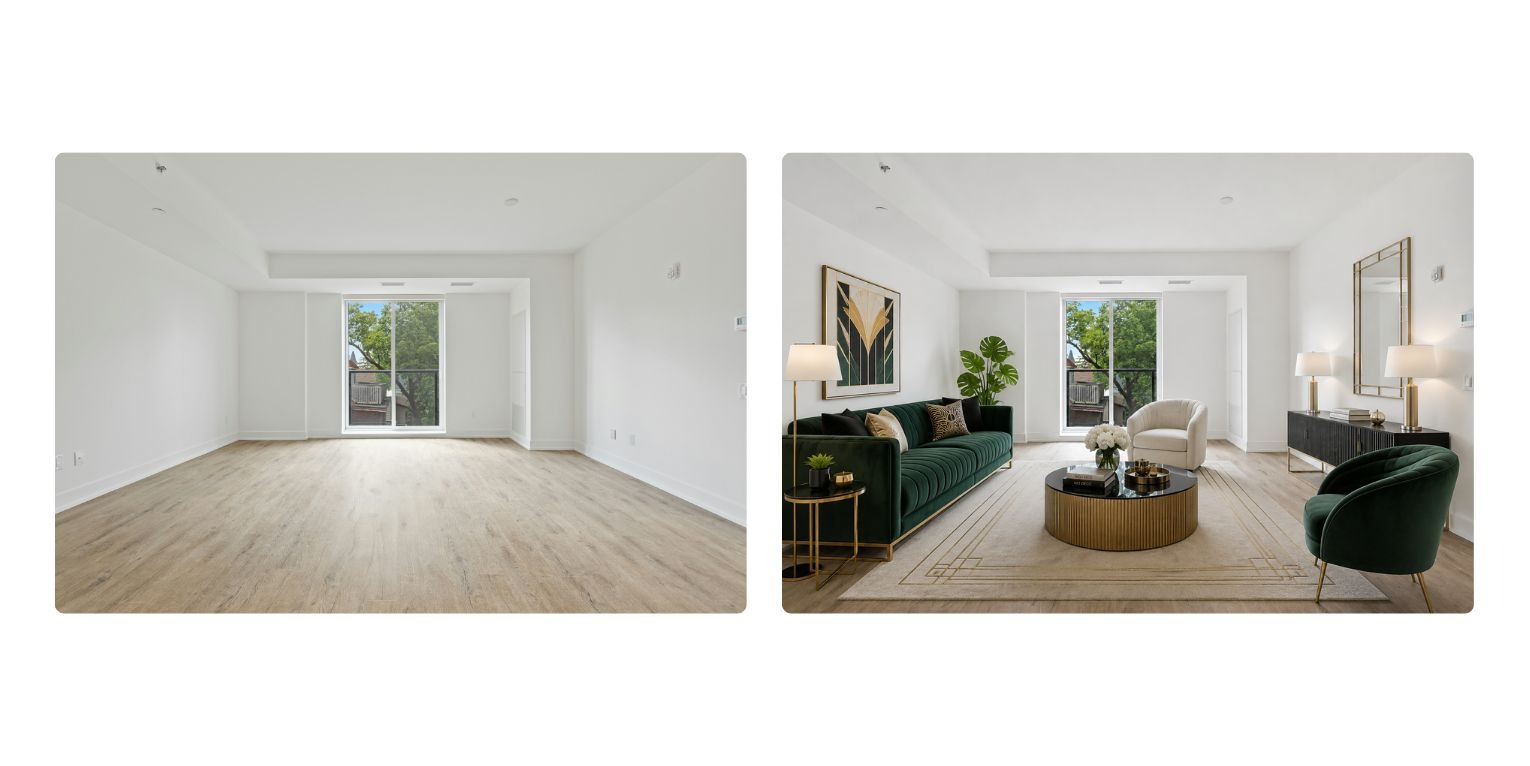
Honestly?
The result isn’t half bad, and you could argue that it’s pretty similar to what a lot of paid AI-powered stage apps can do.
Obviously, both LLMs and AI stagers leave a lot to be desired when it comes to architectural accuracy, but if you’re not using them as a full-blown interior design software (which they are not) and more as a visualization tool, it can work relatively well.
💡 Learn more about the best ChatGPT prompts for real estate agents!
Conclusions
Virtual staging software is a very useful tool for anyone working in the real estate industry, as it helps furnish properties digitally, without the need to physically bring furniture into the space.
It’s way cheaper than physical staging (by over 90%) and requires way less time.
Popular visual staging platforms include fully AI-powered options, where AI generates an image of a decorated space, and human-based platforms, where you can count on actual designers to create the visualization for you.
AI tools are obviously faster and less expensive, while humans usually do a more accurate and creative job.
Here’s a short overview of the best tools available on the market:
🏆 BEST AI VIRTUAL STAGING TOOL: REimagineHome – Best overall balance of realism, real estate-focused features, and value for money.
Other worthy options: AI Virtual Staging, Rendair
🏆 BEST PROFESSIONAL (HUMAN) VIRTUAL STAGING SERVICE: BoxBrownie – The most reliable choice for high-quality, professionally staged listing photos with fast turnaround.
Other worthy options: Virtual Staging Solutions (VSS), Styldod
🏆 BEST AI IMAGE GENERATOR: Midjourney – Produces the most realistic and creative interior visuals, although it requires more prompt-writing skills than dedicated tools.
Other worthy options: Canva AI, RoomGPT
Choosing one of these tools, depending on your needs and design capabilities, will make your listings way more attractive and—hopefully—sell faster.
Virtual staging is only one piece of an effective real estate marketing strategy.
Once you’ve created professional-quality listing photos, you’ll also need a modern website to showcase your properties, attract qualified buyers, and generate leads. Platforms like Placester’s AI website builder for real estate can help you get there!
Check out the Placester tutorial to learn more.
Is virtual staging better than traditional home staging?
It depends on your goals. Virtual staging works significantly faster and is more affordable than traditional home staging, but physical staging still provides a more authentic experience for in-person property viewings.
How realistic are AI-generated virtual staging images?
The best AI virtual staging apps are very realistic and accurate, with more exclusive options offering not only staging but also upscaling and rendering.
Is virtual staging software suitable for real estate agents?
Virtual staging software is a very useful tool for real estate agents, as it helps them promote the listings in a more visually attractive way. Staged properties speak to potential buyers so much more than empty buildings.
Is virtual staging allowed on MLS listings?
Yes, virtual staging is generally allowed on MLS listings, provided the images are clearly labeled as virtually staged and accurately represent the property’s structure and features. However, rules may vary by MLS, so it’s important to check local guidelines.
How much does virtual home staging software cost?
Virtual staging software can cost anywhere from under $1 per image to over $50 per month for subscription plans, while professional human-led staging apps typically charge between $15 and $30 per image. Pricing depends on the platform, image quality, and level of customization.
Are there free virtual staging tools available?
Yes, several platforms offer free runs or limited free credits, including REimagineHome, RoomGPT, Canva AI, and some other AI-powered tools. These free options are usually sufficient for testing the software before committing to a paid plan.
Published on
(Last updated on
)