(800) 728 8391



Quick summary:
- 🏢 Built for brokerages: Lone Wolf’s real strength is back-office accounting and transaction paperwork, not agent marketing.
- ⚖️ Ratings depend on the product: On G2, Transact scores 4.3 out of 5. Cloud CMA sits at 3.7, Relationships at 3.4, and Back Office at 3.
- 💸 No public pricing: Single tools start around $29 to $100 per month, but anything bigger means a sales call and a custom quote.
Lone Wolf Technologies is a suite of real estate software for brokerages, teams, and agents, covering transaction management, back-office accounting, CRM, websites, CMAs, and listing ads. This Lone Wolf real estate review comes down to one conclusion: it’s a strong operating system for mid-size and large brokerages, and a weaker choice for agents who mainly need to generate leads.
The company says its software is “trusted by over 1.5 million agents” and manages over 11 million transactions a year. Those are Lone Wolf’s own numbers, but they explain why so many agents end up using it whether they chose it or not. Your association, MLS, or brokerage may already hand you a Lone Wolf login.
The harder question is which Lone Wolf products are worth paying for yourself. Below, we break down each product, what users say about it, what it costs, and when another tool makes more sense.
AI Websites for Real Estate
Get a custom, ready-to-edit website
in less than 4 minutes.
What is Lone Wolf Technologies?
Lone Wolf Technologies is a real estate software company founded in 1989, with head offices in Cambridge, Ontario, and Dallas, Texas. It started out making accounting software built specifically for real estate, and that’s still where it’s strongest. Today it sells to real estate professionals and brokerages across the US and Canada.
The product lineup you see today mostly came from acquisitions. Lone Wolf bought zipLogix, the company behind zipForm, in 2019 and W+R Studios, the maker of Cloud CMA, in 2020. It then picked up LionDesk and HomeSpotter in May 2021 and Propertybase in August 2021.
In July 2024, Lone Wolf launched Foundation, a cloud platform that puts those products behind one login and shares data between them. Lone Wolf says the goal is to centralize your data and make running your business seamless, so you can pick the modules that fit your business needs instead of buying one big bundle.
Lone Wolf’s product names, then and now
The acquisitions and name changes may mean you’re already using Lone Wolf software without realizing it. Here’s a quick breakdown of Lone Wolf’s product lineup.
| Current name | Formerly known as | What it does | Main user |
|---|---|---|---|
| Transactions (zipForm Edition) | zipForm Plus, zipTMS (TransactionDesk is a separate legacy product) | State and local forms, transaction files | Agents (often via association) |
| Transact | New in 2024 (part of Foundation) | Client-centered transaction management | Agents, brokers |
| Authentisign | Same | eSignatures | Agents |
| Back Office | brokerWOLF | Accounting, commissions, trust accounts | Brokerages |
| Relationships | Replaced LionDesk (shut down in 2025) | Entry-level CRM | New agents |
| Front Office | Propertybase GO | Website, IDX, and CRM | Growing agents, smaller brokerages |
| Propertybase Salesforce Edition | Propertybase | Enterprise CRM on Salesforce | Large brokerages |
| Boost | HomeSpotter Boost | Automated listing ads | Agents, brokers |
| Spacio | HomeSpotter Spacio | Open house sign-in | Agents |
| Cloud CMA | Same (W+R Studios) | CMA reports and listing presentations | Agents |
| BrokerMetrics / AgentMetrics | Terradatum | Market analytics and recruiting | Brokers, agents |
| Foundation | New in 2024 | Platform connecting all of the above | Everyone |
One change matters a lot to anyone who still has an old login. Lone Wolf shut down LionDesk in September 2025 and moved customers to Relationships, its own new CRM.
Lone Wolf reviews: What do agents and brokers say?
Lone Wolf’s ratings vary widely by product, so an overall “Lone Wolf rating” doesn’t tell you much. Transact, one of the newest products, gets the strongest reviews. Back Office has a long track record with real estate brokers, yet it scores lowest.
| Product | Platform | Rating | Reviews |
|---|---|---|---|
| Back Office | G2 | 3 / 5 | 21 |
| Relationships CRM | G2 | 3.4 / 5 | 44 |
| Cloud CMA | G2 | 3.7 / 5 | 19 |
| Transact | G2 | 4.3/5 | 60 |
Transact leads at 4.3 out of 5 across 60 reviews, followed by Cloud CMA at 3.7 and Relationships at 3.4. Back Office trails at 3 out of 5. Keep the sample sizes in mind, though. Back Office’s score rests on just 21 reviews, and Cloud CMA’s 19 reviews are tiny next to Lone Wolf’s claim that 650,000 agents generated 5.4 million Cloud CMA reports last year.
However, if you look at user feedback on pages like Reddit, it tells a different story. Here’s a review from u/MaeliaDavis from April 2024:

“I wish I had read something about Lone Wolf Technologies before I signed up with them. I have wasted thousands of dollars and am still unable to use it. They promise support when you sign up and give you a 3 month “free” window to get started then your contract starts and it has NO EARLY TERMINATION clause. […]
This system is for large brokerages that can have 2-3 full time people working for 3-6 months only on setting this up. If you are planning to do this with one or two people who already have jobs at the brokerage doing something else it will never work. It is so time intensive and not flexible at all.”
Maelia Davis, Reddit
Keep in mind that a lot can change in 2 years, so take this review with a grain of salt. Then again, a more recent comment from u/Silent_Low8614 from June 2025 shares a similar sentiment:
“I fell for their Brokerage Back Office bait crap. Their call centers are off shore and then their commission based SALES agents are here in the US and their only goal is to make income off promissing some amazing service. Its NOT and they refuse to answer their phones AFTER you have signed their BS contract.“
Silent_Low8614, Reddit
✅ Pros of using Lone Wolf
- Real estate accounting from start to finish: Capterra reviewers single out commission splits, agent billing, and trust accounting. One office manager said, “the flow from listing to closing is unmatched.”
- Reporting: Users value the financial and productivity reports for tracking commissions and agent performance. Lone Wolf says Back Office includes more than 100 scheduled and custom reports.
- Forms you may already have for free: Transactions (zipForm Edition) is a free member benefit for California Association of REALTORS® members, and several other state associations offer zipForm too.
- Phone support for complex problems: Several Back Office reviewers praise the phone team for working through accounting issues with them.
❌ Cons of using Lone Wolf
- Manual data entry: A broker on Capterra wrote that Back Office “relies heavily on manual data entry and lacks integrations essential for modern brokerages.” Agent payments and bank connections come up most often.
- Dated interface: One Capterra reviewer said Back Office “feels like an MSDOS system.” That’s harsh, but other reviews also describe the navigation as clunky.
- Inconsistent support: Recent reviews mention account managers who don’t respond and tickets that take a long time to resolve.
- Opaque pricing: Lone Wolf doesn’t publish prices for its brokerage products, which are quoted individually. A review on dmrmedia.org also describes slow, weeks-long setup for Lone Wolf’s website products.
Lone Wolf features: Product-by-product review
Lone Wolf software is modular, with tools designed for each stage of a deal, so the best way to judge it is one product at a time. Each section below covers what the product does, who it suits, and its main tradeoff.
Lone Wolf Transactions and Transact: Is zipForm still the standard?

Source: Capterra
For forms, mostly yes. zipForm has been the default in many states for years, and Lone Wolf says its transaction tools handle over 11 million transactions and 30 million signatures a year.
There are now two transaction products. Transactions (zipForm Edition) is the forms-first tool that many associations provide. Transact is a newer product that organizes deals around the client instead of the property. According to Lone Wolf, if a deal falls through, the client’s details carry over to the next property automatically, so you don’t have to re-enter them. Lone Wolf says Transact is designed to help agents streamline the workflow from offer to close while staying compliant, and teams can assign multiple transaction roles so agents and admins collaborate on the same file.
Best for: Agents whose association already includes zipForm, and brokers who need compliance review.
Pro: Licensed state forms with MLS data that fills in automatically.
Con: Transact has no independent user reviews yet.
Lone Wolf Back Office: Does it justify the cost for brokers?
Source: Capterra
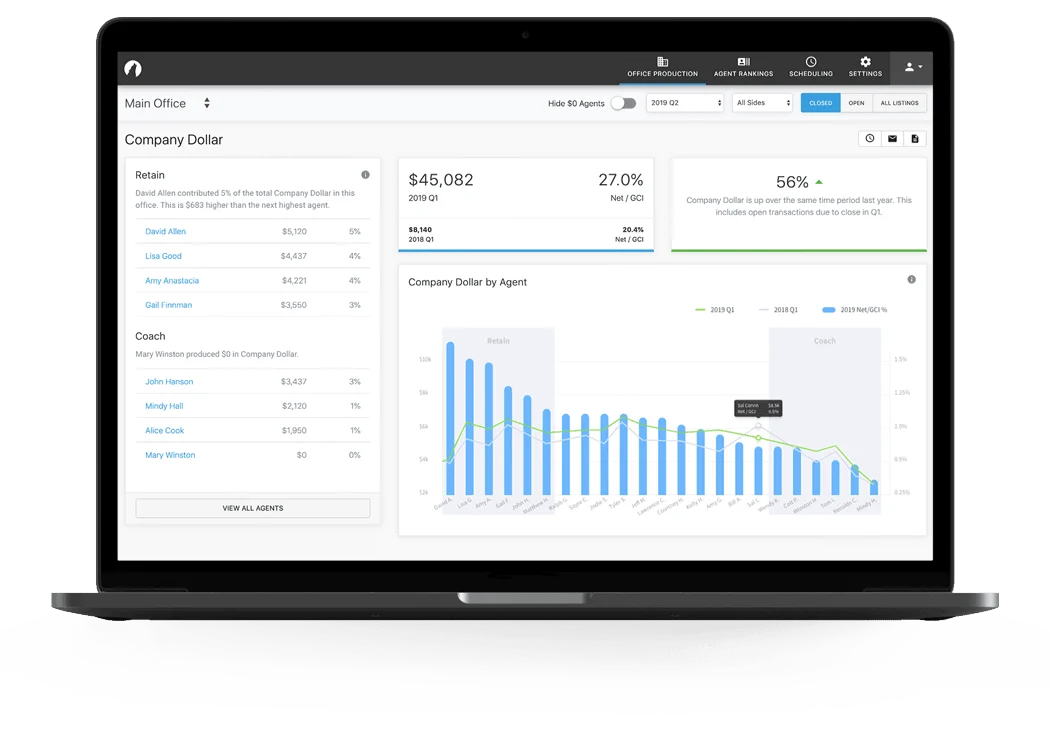
In our view, it usually does once a brokerage has a few dozen agents and complicated commission plans. Lone Wolf markets it as complete real estate back office software, combining GAAP-compliant accounting, payroll, escrow and trust management, and commission automation in one system built for brokerage operations.
You don’t need QuickBooks plus spreadsheets. Lone Wolf describes its reporting as industry-leading, and reviewers agree the built-in reporting tools give a real-time view of agent production and office profitability.
It’s also Lone Wolf’s best-reviewed product by a wide margin. The trade-offs are setup time and price. Third-party listings put the starting price at $100 per month, and Lone Wolf sells it through demos and custom quotes.
Best for: Brokerages that run trust accounts and many commission structures.
Pro: Accounting and reporting built for real estate.
Con: Manual entry and limited bank integrations.
👉 See how Back Office compares with other tools in our guide to the best real estate broker software.
Lone Wolf real estate CRM: Enough to manage your pipeline?
Source: Capterra
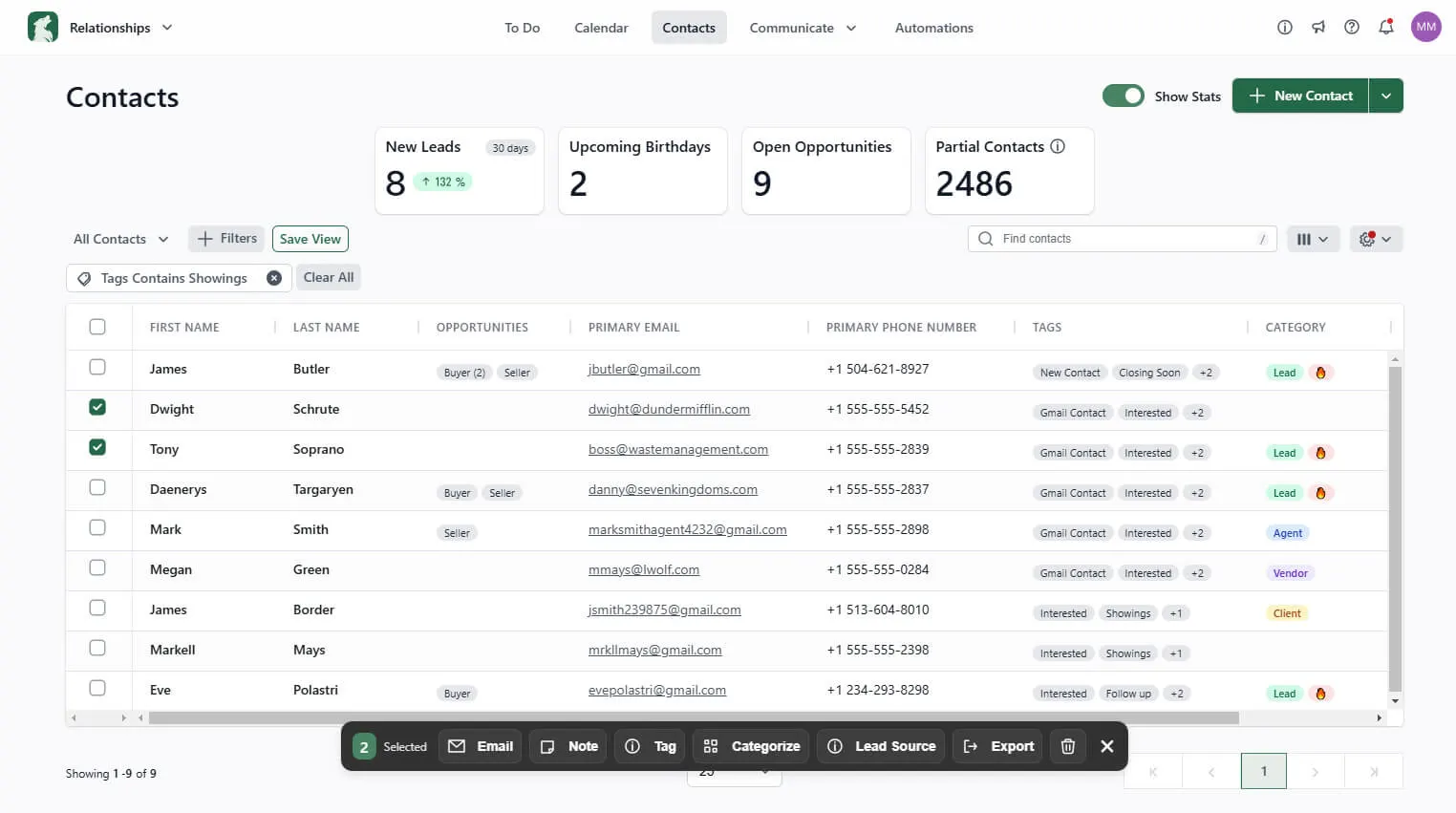
Maybe, if you’re a new agent, a busy team will likely outgrow it. Lone Wolf now offers three CRMs: Relationships for new agents, Front Office for growing agents and small teams, and Propertybase Salesforce Edition for enterprise brokerages.
Relationships covers the basics of customer relationship management: contact syncing, an AI email composer that helps agents personalize each message, individual and bulk texting for outreach, and Google and Outlook integrations.
Its 3.4 rating on G2 is middling for a CRM. Tellingly, Lone Wolf itself now promotes a Follow Up Boss integration that syncs CRM data with its transaction and operations tools. Many teams keep Lone Wolf for paperwork and use a separate CRM for leads.
Best for: Newer agents who want a simple contact manager to stay organized and keep up with follow-up.
Pro: Low price and AI-assisted email.
Con: Weaker ratings than standalone CRMs.
👉 New to CRMs? Learn what a real estate CRM does before you compare options.
Lone Wolf Front Office: Can they generate leads on their own?

This is the weakest part of the lineup. Front Office, built on Propertybase GO, offers customizable templates in a drag-and-drop website builder, plus IDX listings, a CRM, and tools to automate email campaigns (Lone Wolf). On paper, it covers the essentials.
To see how it holds up in practice, we checked three live brokerage homepages running on Front Office on October 6, 2026. We confirmed each one by the Propertybase and Lone Wolf code in its page source.
| Check | Site A (Florida) | Site B (Massachusetts) | Site C (New York) |
|---|---|---|---|
| Median server response (5 tests) | 1.75 s | 1.87 s | 2.18 s |
| Homepage HTML size | 206 KB | 177 KB | 468 KB |
| H1 heading | Two H1s | Missing | One H1 |
| Title and meta description | Yes | Yes (generic) | Yes |
| Lead capture forms on homepage | 3 | 3 | 3 |
| Organization schema | Yes | Yes | Yes |
In our limited test, all three sites took about 1.8 to 2.2 seconds just to start sending the page. Google’s guidance calls a server response time of 0.8 seconds or less “good” (web.dev). Our tests ran from a single location outside the U.S., which adds some delay. Even so, the gap was large and consistent across all three sites.
The SEO basics were mixed. One homepage had no H1 heading, and another had two. Both findings fit what dmrmedia.org reported: Lone Wolf sites tend to be rigid and template-driven, and sometimes slow (DMR Media, January 2026). Lead capture was the bright spot, with several forms on every homepage we checked.
Best for: Brokerages that want their website and CRM inside Foundation.
Pro: Website, IDX, and CRM in one login.
Con: Slow server responses and inconsistent on-page SEO in our limited spot check.
👉 Comparing builders? See what to look for in IDX websites.
Boost and digital ads: Worth adding?

Source: Capterra
Boost is Lone Wolf’s automated digital marketing tool for listing ads, formerly part of HomeSpotter. It pulls listing details from the MLS, builds branded ads, and places them across social media and partner sites, with geo-targeting and reports that let you share real-time campaign results with each seller.
It’s useful for showing sellers activity on their listing. It isn’t a full lead generation system, and pricing depends on the campaign. Lone Wolf says it delivers 365 million digital ad impressions a year.
Best for: Listing agents who want hands-off ads to share with sellers.
Pro: Ads built from MLS data in minutes.
Con: No published pricing, and results depend on your ad budget.
Cloud CMA and BrokerMetrics: Useful extras or overkill?
Source: Capterra
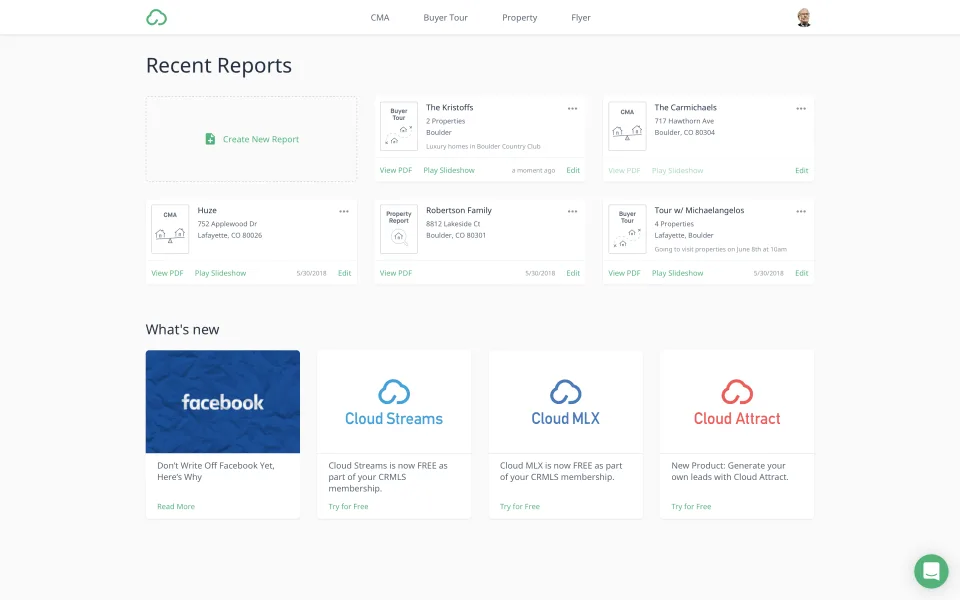
Cloud CMA builds branded CMA reports, buyer tours, and automated market updates from live MLS data. It costs $49 per month or $499 per year. It’s widely used and rates 3.7 out of 5 on G2, though that’s based on just 19 reviews. Read more about building a strong comparative market analysis (CMA).
BrokerMetrics is a market-share and recruiting tool used by more than 10,000 brokerages (GlobeNewswire, July 2026). The new Aspen assistant uses artificial intelligence to help brokers recruit prospects and flag agents who might leave. For a brokerage that’s actively recruiting, that data can be a competitive edge. For a solo agent, it’s overkill.
Integrations and the Foundation platform
Foundation is supposed to fix the oldest Lone Wolf complaint: entering the same data more than once. Its products now share a login and some data within the platform, and the February 2026 API portal opens connections to third-party tools. One integration partner said they went live within two weeks.
Recent Capterra reviews still mention manual entry and missing bank and payment integrations, though. So Foundation is a real improvement, but it doesn’t solve everything yet.
Lone Wolf real estate pricing: What will you actually pay?
Lone Wolf doesn’t publish prices for most of its products. Third-party listings show single tools from about $29 to $100 per month, while brokerage packages are quote-based and usually billed on annual contracts. Your real cost depends on how many agents you have, which modules you choose, and what your association already provides.
| Product | Starting price | Billing | Source |
|---|---|---|---|
| Transactions (zipForm Edition) | Free for many association members | Membership benefit | C.A.R. |
| Transact | $349/year | Annual | GetApp |
| Relationships CRM | $399/year (≈ $33/month) | Annual | GetApp |
| Cloud CMA | $49/month or $499/year | Monthly or annual | Capterra |
| Back Office | From $100/month | Quote-based | Capterra |
| Front Office, Boost, BrokerMetrics | Not published | Quote-based | Lone Wolf sales |
Estimated monthly cost by business size
To make the numbers more concrete, we added up list prices for three common setups. Transact ($349 per year, about $29 per month) and Relationships ($399 per year, about $33 per month) are shown at their annual rates divided by 12.
Cloud CMA is shown at its $49 monthly rate; on the $499 annual plan, it drops to about $42 per month. Per agent, that works out to $29 + $33 + $49 ≈ $111 per month, or ≈ $82 if your association already covers forms.

| Scenario | What’s included | Estimated cost |
|---|---|---|
| Solo agent, forms through association | Relationships + Cloud CMA | ≈ $82/month |
| Solo agent, no association access | Transact + Relationships + Cloud CMA | ≈ $111/month |
| 10-agent team, individual licenses | Transact + Relationships + Cloud CMA for each agent | ≈ $1,113/month |
These are list-price estimates built from individual licenses, not quotes. Teams and brokerages usually negotiate bundles, so treat the totals as a starting point for that conversation, not a quote. Before signing, ask about contract length, cancellation terms, implementation fees, and data export.
Who is Lone Wolf best for, and who should skip it?
Lone Wolf makes the most sense for a real estate brokerage whose biggest headaches are accounting and compliance. It makes the least sense for agents whose biggest headache is getting more leads.
Lone Wolf is a good fit if you:
- Run a mid-size or large brokerage with trust accounts and several commission plans
- Already get Transactions (zipForm Edition) through your association or MLS
- Want accounting, transactions, and reporting connected in one place
- Have an operations or accounting person who can own setup and training
Look elsewhere if you:
- Are a solo agent or small team whose main goal is lead generation
- Want a modern website that you can manage and optimize yourself
- Want published, month-to-month pricing for brokerage-level tools
- Don’t want to pay for an integrated suite when you only use one or two tools
Lone Wolf alternatives
There isn’t one replacement for Lone Wolf, because it does several different jobs. The right alternative depends on which job you want to replace. Here are the strongest options, grouped by what they actually cover.
1. Placester + Follow Up Boss (website, IDX, and CRM)
This pairing is for agents and brokerages that keep Lone Wolf for paperwork and accounting but want a stronger online presence and CRM. Placester aims to simplify the marketing side: it covers the website, IDX, and lead capture, and new website leads flow seamlessly into Follow Up Boss.
Follow Up Boss handles follow-up and tracks lead sources, and since Lone Wolf now integrates with Follow Up Boss, the CRM can sync with your transaction data.
Placester agent plans start at $59 per month with a 14-day free trial and no contracts, and broker and team plans run from $199 to $599 per month. Brokers can give every agent their own website, manage the roster from one admin account, and route leads automatically with broker and team management software. Follow Up Boss starts at $69 per user per month on the Grow plan, as covered in our Follow Up Boss review.
AI Websites for Real Estate
Get a custom, ready-to-edit website
in less than 4 minutes.
Doesn’t replace: Back Office accounting or transaction forms.
2. BoldTrail (all-in-one CRM, websites, and back office)
BoldTrail, the platform formerly known as kvCORE, is the closest all-in-one competitor to Lone Wolf. It combines a CRM, IDX websites, lead generation, and optional back-office and recruiting modules. Pricing isn’t published either, but figures reported online put solo agents around $499 per month, plus setup fees, as we covered in our BoldTrail review.
Its BoldTrail BackOffice module (formerly Brokermint) is also one of the few real alternatives to Lone Wolf Back Office for commission and accounting workflows.
3. dotloop or SkySlope (transaction management)
If transaction management is the only Lone Wolf product you’d replace, dotloop and SkySlope are the main alternatives. Dotloop’s agent plan costs roughly $32 to $35 per month, depending on billing, while SkySlope prices brokerage plans by quote.
4. Paperless Pipeline (transaction management for small brokerages)
Paperless Pipeline is built for small and mid-size brokerages that want simple compliance and document workflows with transparent pricing. Plans start at $65 per month for five transactions, with unlimited users and no setup fees.
Which Lone Wolf alternative should you choose?
| Tool | Replaces which Lone Wolf product | Starting price | Best for |
|---|---|---|---|
| Placester + Follow Up Boss | Front Office, Relationships | $59/month + $69/user/month | Lead generation, IDX websites |
| BoldTrail | Front Office, Relationships, parts of Back Office | ~$499/month (unpublished) | Teams wanting one all-in-one vendor |
| dotloop | Transactions, Transact | ~$32 to $35/month | Agents and offices focused on paperwork |
| SkySlope | Transactions, Transact | Quote-based | Brokerages with heavy compliance needs |
| Paperless Pipeline | Transactions | $65/month | Small brokerages wanting transparent pricing |
Brokers who need full trust accounting have fewer options here than anywhere else in the lineup. Large national brokerages such as Compass build their own technology, but most independent offices assemble a stack. For many of them, the practical setup is Lone Wolf behind the scenes and best-in-class tools in front.
Is Lone Wolf worth it for your real estate business?
Lone Wolf is worth it for brokerages that need serious back-office accounting and connected transaction compliance. It’s harder to justify for agents who mainly need leads, a website built for search, and a CRM they’ll actually use. Our final Lone Wolf review scores are below.
| Product | Our score | Verdict |
|---|---|---|
| Back Office | ⭐ 3.5 / 5 | Deep brokerage accounting, but the lowest G2 rating of the four |
| Transactions / Transact | ⭐ 4 / 5 | Standard forms; Transact rates 4.3 on G2 |
| Cloud CMA | ⭐ 3.5 / 5 | Widely used; 3.7 on G2 from a small sample |
| Relationships CRM | ⭐ 3 / 5 | Basic CRM for new agents |
| Front Office websites | ⭐ 2.5 / 5 | Functional, but slow server responses and uneven SEO basics in our limited spot check |
If Lone Wolf already runs your paperwork and accounting, you don’t need to replace it to win more clients. What you need is a website that does the job Front Office struggled with in our spot check: getting found in search and turning visitors into leads.
That’s the job Placester is built for. Our AI website builder drafts an agent or brokerage site in minutes, and an AI content assistant helps you fill it with community pages and blog posts. Every plan includes an SEO foundation designed for both Google and AI search, including an automatically generated llms.txt file.
IDX listings connect to more than 600 MLSs, while lead capture popups, forms, and a built-in CRM catch every inquiry. Prefer another CRM? Leads can flow straight into Follow Up Boss or through Zapier. Brokers can give every agent a branded site and manage the whole roster from one account, and if you’d rather not build anything yourself, Placester’s team can set up and maintain the site for you.
Plans start at $59 per month with no long-term contracts, and annual billing saves 20%. Start your free trial today and see how easy it can be to increase your visibility online.
AI Websites for Real Estate
Get a custom, ready-to-edit website
in less than 4 minutes.
FAQ
Is Lone Wolf a good company?
Lone Wolf is an established real estate software company founded in 1989, and it says it’s trusted by over 1.5 million agents. Its ratings are mixed: Transact scores 4.3 out of 5 on G2, while Back Office scores 3, and recent reviews mention slow support.
How much does Lone Wolf Relationships cost?
Lone Wolf Relationships lists at $399 per year, or about $33 per month, according to GetApp. When Lone Wolf retired LionDesk in 2025, it said Relationships would be priced on par with LionDesk, which started as low as $25 per month. Lone Wolf doesn’t publish the price itself, so confirm current pricing and contract terms with the sales team.
What is Lone Wolf used for in real estate?
Brokerages mainly use Lone Wolf for back-office accounting, commissions, and transaction management. Agents use it for state forms (zipForm), electronic signing (Authentisign), CMAs (Cloud CMA), listing ads (Boost), and a basic CRM. Most products now connect through Lone Wolf Foundation, a cloud platform launched in 2024.
Who is the CEO of Lone Wolf Technologies?
Matt Fischer has been CEO of Lone Wolf Technologies since February 2026. He replaced Jimmy Kelly, who moved into an advisory role. Fischer previously spent 22 years at the CRM company Bullhorn, most recently as president and chief operating officer (HousingWire, 2026).
Is zipForm part of Lone Wolf?
Yes. Lone Wolf acquired zipLogix, the maker of zipForm, in 2019. zipForm Plus and zipTMS are now called Lone Wolf Transactions (zipForm Edition). Several state associations, including the California Association of REALTORS®, provide it to members as a free benefit.
What is the best alternative to Lone Wolf for agents?
It depends on which job you’re replacing. For lead generation, an IDX website like Placester paired with a CRM like Follow Up Boss covers more than Lone Wolf’s agent tools. For transactions, dotloop and SkySlope are the main options. BoldTrail is the closest all-in-one competitor.
Published on