(800) 728 8391


Quick summary:
- A Google Business Profile is free and decides whether you show up in the map results when someone searches for an agent in your city.
- Google treats agents as individual practitioners: one profile per agent, reachable in person during stated hours, named the way Google’s rules describe.
- Your primary category is the most important ranking factor you control, according to Whitespark’s 2026 Local Search Ranking Factors survey.
- If you work from home, hide your address and list the areas you serve. Never use a virtual office, a mailbox, or a P.O. box.
- 68% of consumers now only use businesses rated four stars or higher (BrightLocal, 2026), so a steady flow of reviews matters.
- Your profile feeds Google’s Gemini-powered Ask Maps answers, so incomplete details cost you in AI search too.
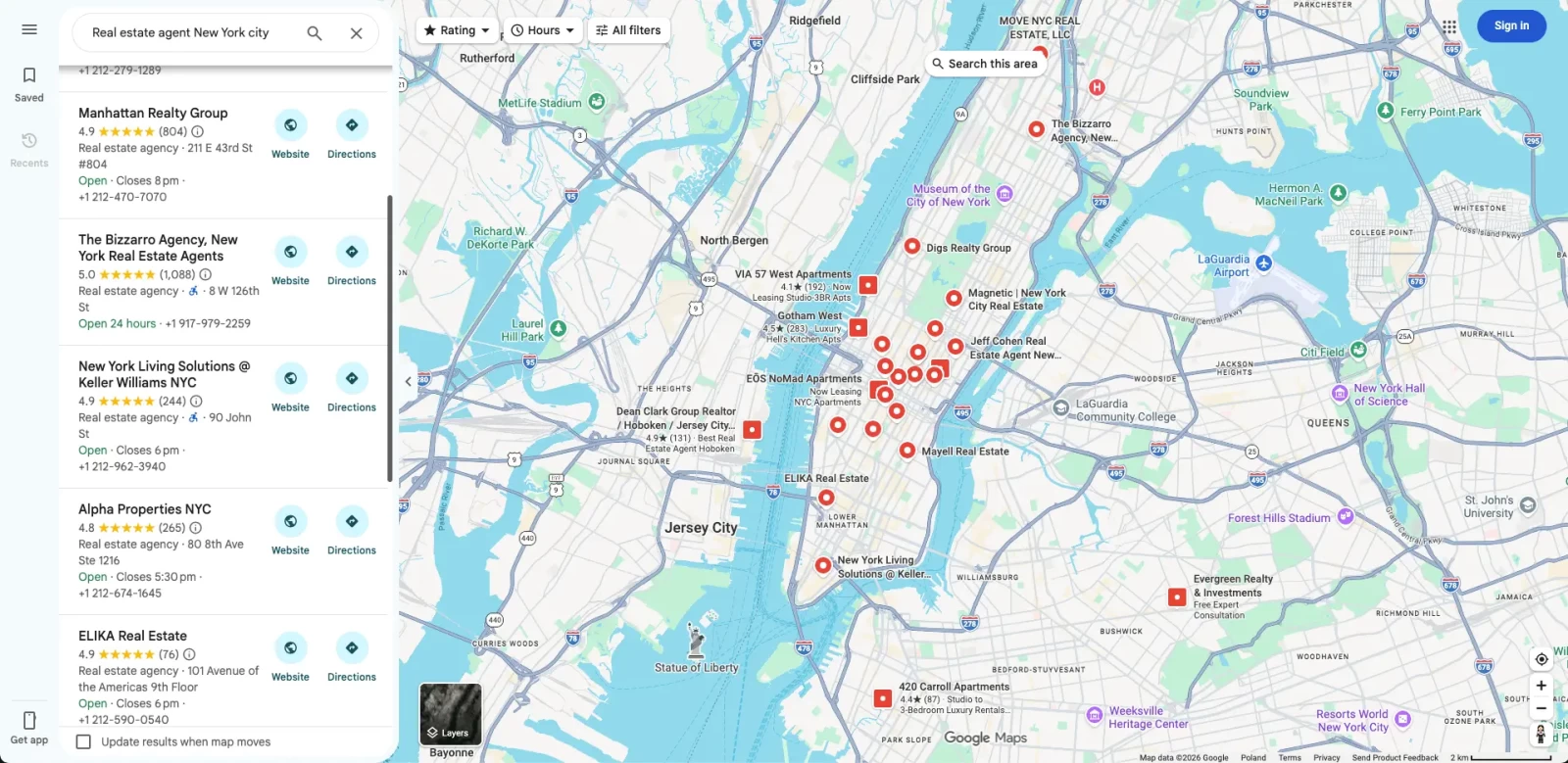
Search for a real estate agent near you on your phone and look at what shows up first. Before a single website appears, Google lists three local agents on a map, each with a star rating, a phone number, and a button to call.
Those are the top three local search results, and the free tool that puts an agent there is a Google Business Profile, formerly known as Google My Business.
Most agents set up a profile once and never touch it again. Others built theirs on old advice: listing the brokerage address, stuffing keywords into their business name, or seeding questions in a Q&A section that no longer exists. Some of those habits now cost rankings. A few can get the profile suspended.
If you’re one of the real estate agents looking for a free way to win more local searches, this guide is for you. It covers whether you’re eligible, how to set up the profile, what moves your ranking in the map pack, and how it now feeds AI search answers.
What does a Google Business Profile do for real estate agents?
It’s the free business listing that controls how you appear across Google Search and Maps: your name, category, contact details, website, service area, hours, photos, and reviews.
Google renamed it from Google My Business in late 2021, and many agents still call it a GMB profile. The standalone app is gone; you now edit your profile directly from Search or Maps while signed in.
Your profile appears in two places that matter:
- Branded searches. When a referred client types your name, your profile appears in the Google Business panel beside the results page on desktop, or at the top on mobile, with your reviews, photos, and contact details. For many prospects, it’s the first thing they see.
- Non-branded local searches. When people searching for agents type “agent near me” or “best real estate agent in Tampa,” Google shows a map with three nearby businesses (the map pack) above the organic results. You can appear there even if your real estate website doesn’t reach the first page yet.
That second point is why the profile matters so much for newer agents. Organic search engine rankings for a website can take months. A complete, accurate profile can help you show up on Google Maps for local searches far sooner.
Completeness also helps you build trust with prospective clients. Google’s Help Center states that customers are 2.7 times more likely to consider a business reputable when its profile is complete, and 70% more likely to visit it.
Why do agents need a profile if referrals still win?
In the world of real estate, referrals still bring in more clients than any other channel. But referred clients check you out online before they call, and the share of sellers who find their agent online has more than doubled since 2018.
According to NAR’s 2025 Profile of Home Buyers and Sellers (Exhibit 4-6, summarized by BAM), 43% of buyers found their agent through a referral from a friend, neighbor, or relative, and only 6% found their agent through a website. Read that alone, and a profile looks optional. Zillow’s numbers tell the other half of the story.
Zillow’s 2025 Consumer Housing Trends Report for Agents found that 36% of sellers now find their agent online, up from 15% in 2018, and that 59% of sellers and 47% of buyers hire the first agent they speak with.
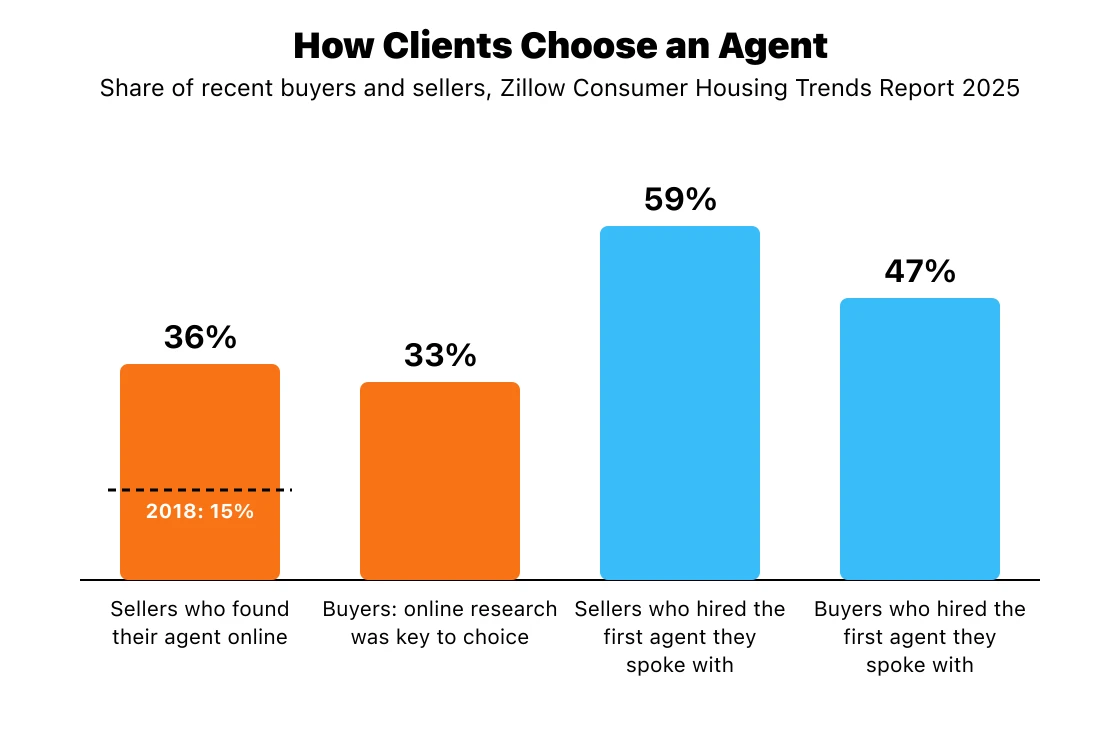
Put that next to NAR’s data and a pattern appears: a referral gets your name onto a short list, and your online presence decides whether you get the first call.
When a friend says “you should talk to Maria,” the next thing the prospect does is search for Maria, whether they’re a buyer or seller. Her profile is one of the main places they’ll land.
Cost matters too. Portals like Zillow and Realtor.com charge for premium placement and real estate leads. A Google Business Profile is one of the few channels that costs nothing, makes it easier for referred clients to find you, and sends traffic straight to your own site and phone between transactions.
Few real estate marketing channels are cheaper to maintain. For the wider picture on ranking in your market, see our guide to local SEO for real estate agents.
Are you eligible? Agent, team, and brokerage profiles
You’re probably eligible to claim your own profile. Google’s guidelines treat real estate agents as individual practitioners, the same group as doctors, lawyers, and financial planners: public-facing professionals with their own customer base. To qualify, clients must be able to reach you directly at your verified location during your business hours.
The practitioner rules come with limits agents often miss:
- One profile per agent. You can’t create separate profiles for each specialty, city, or price point.
- No profiles for support staff. Your transaction coordinator or assistant can’t have one.
- Lead generation agents don’t qualify. Sales associates working leads for a corporation, rather than their own clients, aren’t eligible.
Solo agents, teams, and offices
If your brokerage office has several agents, the office should have its own profile, separate from each agent’s personal profile. In that case, Google says the agent’s profile title should include only the agent’s name, not the brokerage’s.
If you’re a solo agent and the only one clients deal with at a branded location, Google suggests sharing one profile with the organization instead (its example is “Allstate: Joe Miller”).
Google doesn’t spell out rules for a real estate team, but the same logic applies: one profile for the team at its real location, plus individual profiles for agents who meet clients directly.
One compliance note: many states’ advertising rules and most brokerage policies require the brokerage name in your advertising, while Google wants just your name in the title when your office has its own profile.
If the two conflict, talk to your managing broker before you publish, and mention the brokerage in your business description and on your website rather than in the title.
If you work from home
Set up as a service-area business and hide your address. Google asks these businesses to keep their address hidden and to remove a residential address from the profile. You’ll list the cities or ZIP codes you cover instead. Here’s how the options compare:
| Setup | Who it fits | What Google requires | Ranking trade-off | Suspension risk |
|---|---|---|---|---|
| Office address shown | Agents who meet clients at a staffed office | Clients received at the address during stated hours | Gets the address-based factors | Low, if the office is real and staffed |
| Hidden address with a service area | Agents who work from home and meet clients at properties or cafés | Address hidden; cities or ZIP codes listed instead | Gives up the address-based factors | Low |
| Co-working space | Agents who rent a desk | Clear signage, customers received during hours, and your own staff | Same as an office, if it qualifies | Medium: easy to fall short of the rules |
| Virtual office or P.O. box | Nobody | Not eligible | None | High |
Requirements: Google Business Profile guidelines. Ranking factors: Whitespark Local Search Ranking Factors 2026.
Some setup guides suggest using a P.O. box or a rented mailing address to get verified. Don’t. Google’s rules are explicit: “P.O. boxes or mailboxes located at remote locations aren’t acceptable,” and a location you don’t actually operate from, a “virtual office,” isn’t eligible either. If you don’t have a staffed office, hiding your address is the legitimate route.
Agents at virtual or cloud-based brokerages
In May 2026, Sterling Sky reported that Google was suspending profiles belonging to eXp Realty agents, citing a Google support reply that said: “Our guidelines currently restrict us from working with cloud-based brokerage models.”
Google hasn’t announced a formal policy, and at least one local SEO practitioner says they haven’t seen it with their own clients. Sterling Sky’s take: an agent who meets clients face-to-face can still qualify by hiding their address, while a fully virtual operation can’t.
If you’re at a cloud-based brokerage, meet clients in person, keep proof of it (a business license, closing records, photos of your office or vehicle), and keep your profile title to the name you actually use.
How to set up your Google Business Profile in 7 steps
Setting up the profile is quick, but you’ll need to verify it before you have full control, and the verification process can take several business days. You’ll need a Google account: use one you control, not a shared brokerage login, so you keep the profile if you change brokerages. A business email address keeps it separate from your personal inbox.
- Sign in and start. Go to google.com/business and sign in.
- Search for an existing profile. Google sometimes creates profiles automatically. If yours exists and shows a link that says “Own this business?”, use it to claim the profile instead of creating a duplicate.
- Enter your business name. Use your real-world name exactly as it appears on your signage, business cards, and website. “Jane Smith, Realtor” is fine. “Jane Smith | Best Austin Homes for Sale” isn’t.
- Choose your primary category. Choose “Real estate agent” if you work as an individual agent, or “Real estate agency” for an office or team. Pick “Real estate consultant” or “Property management company” only if that’s genuinely the core of your work.
- Add your business location or areas served. Enter an office address only if clients visit you there during your listed hours. Otherwise, hide the address and add the cities or ZIP codes you cover.
- Add your business phone number and website. Use a direct line clients can reach you on, and link to your own website rather than a brokerage roster or portal page.
- Verify your business. Google offers verification methods based on your category and location. Practitioners report that many new profiles are now asked to record a short video in the Maps app showing signs, business documents, or proof that you operate in the area. Have those ready before you start recording.
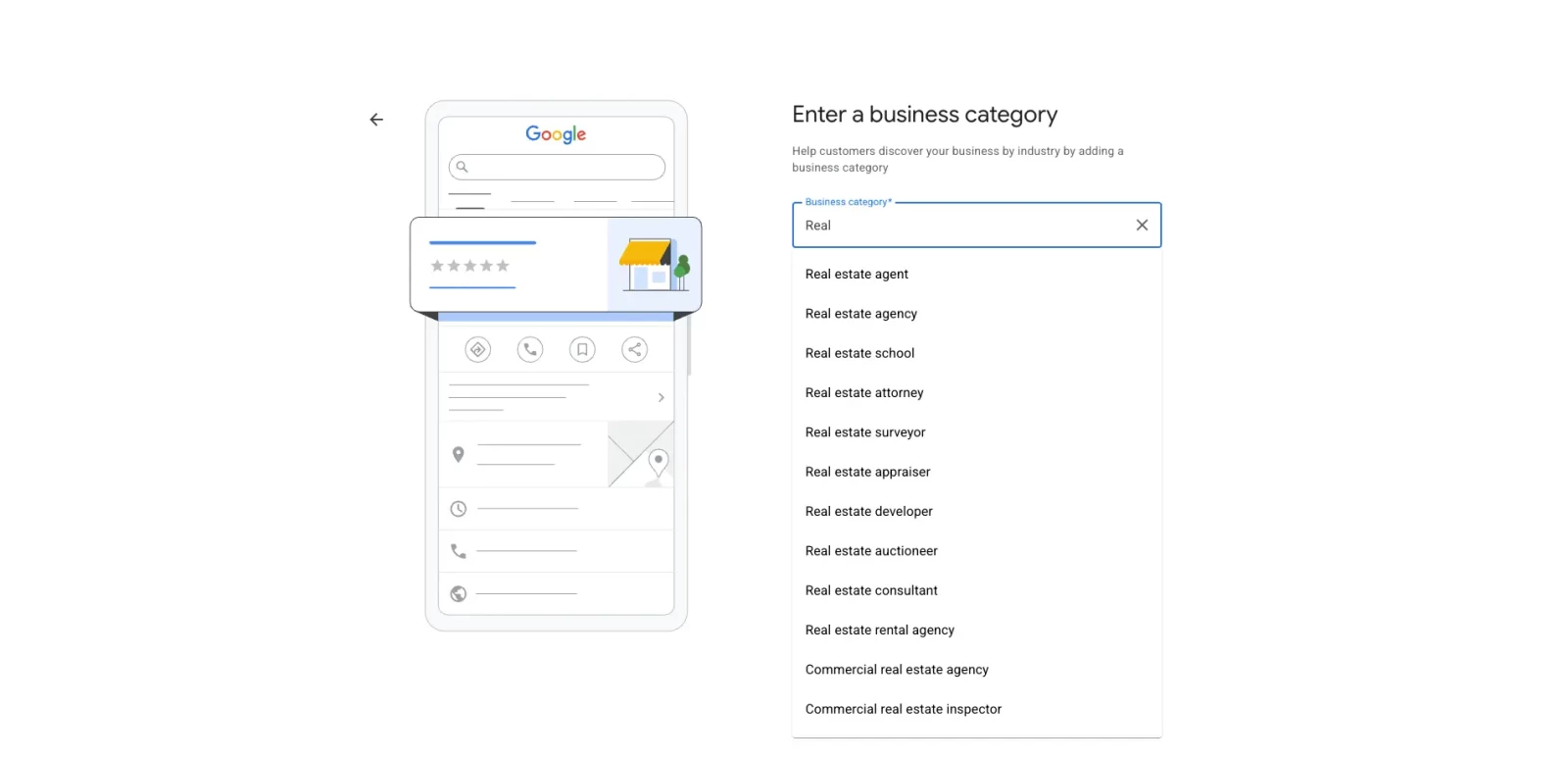
Category choice deserves the most thought. Whitespark’s 2026 survey of 47 experts ranked the primary category as the number one factor for map pack rankings, ahead of even the searcher’s proximity to your business. If you’re unsure, check whether the top-ranking agents in your market use terms like “real estate agent” or “real estate agency” as their main category.
How to optimize your profile for the map pack
Google says local results are mainly based on relevance, distance, and popularity, which it also calls prominence. You can’t move closer to every searcher, so ranking comes down to what you can control: categories, completeness, accuracy, and reviews.
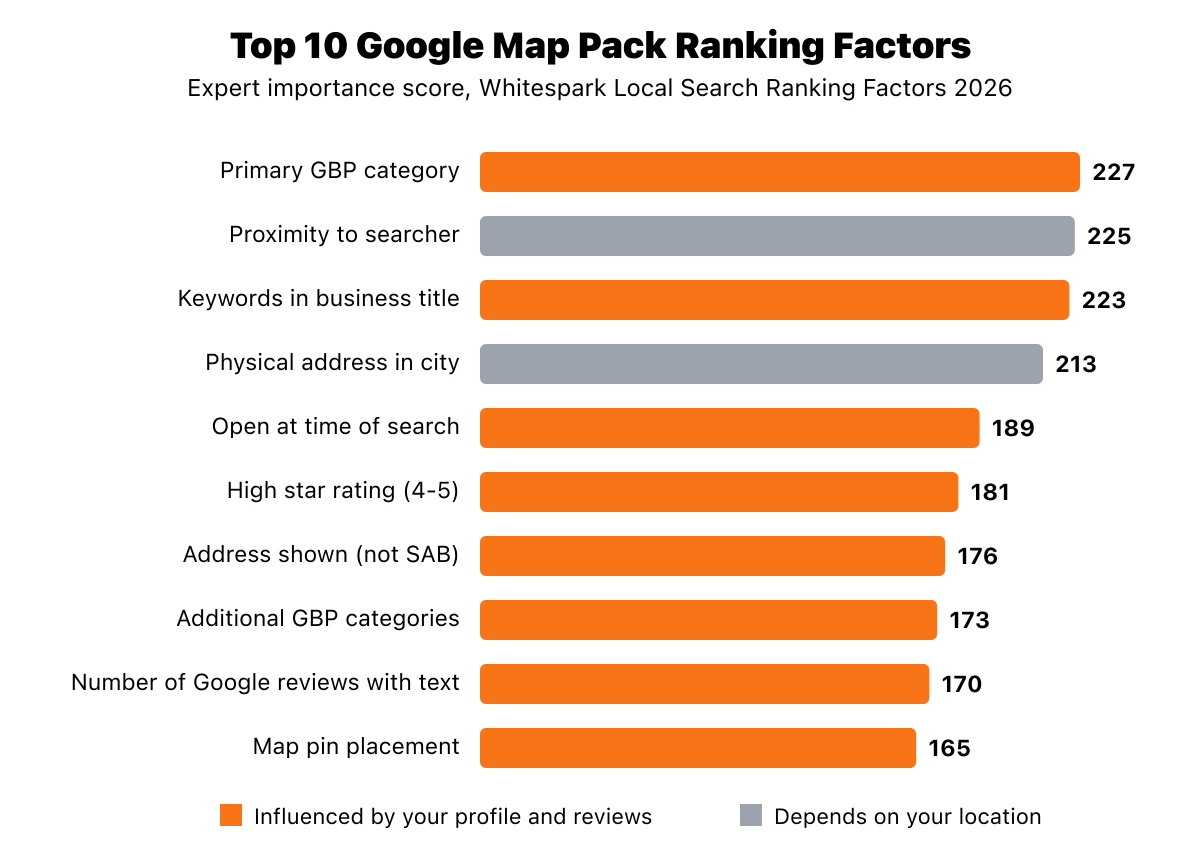
Source: Whitespark Local Search Ranking Factors 2026. Scores reflect expert importance ratings, not measured Google data.
Eight of the ten are things you influence through your profile and reviews. Proximity and having a physical address in the searcher’s city depend on where you actually work. Here’s how to work on the rest:
Choose your categories carefully
Your primary category tells Google what kind of business you are, and it’s the factor Whitespark’s experts rank highest. For most individual agents, the right pick is the real estate agent category. Once that’s set, you can add secondary categories, which rank eighth on the same list.
Only add categories that describe work you actually do. A consulting category makes sense if you offer paid consulting, but piling on unrelated ones won’t help you rank and can confuse searchers about what you offer.
Write a clear profile description
Google allows up to 750 characters for your description, with no links or HTML. Use that space for a brief description of what you do, where, and for whom: the neighborhoods you know, the types of clients you help, and your brokerage.
Then add what makes your business unique, such as a focus on condos, relocation, or first-time buyers. Write it for buyers and sellers rather than a keyword tool, and skip promotional claims like “#1 agent in town.”
List your services one by one
The services section lets you spell out your real estate services individually instead of leaving searchers to guess. Google lets you choose from suggested services or create custom ones.
Typical entries for agents include buyer representation, seller services, relocation help, first-time buyer guidance, and investment properties. Keep each name plain and specific so it matches the way clients describe what they need.
Add photos regularly
Add photos to your profile from day one: a professional headshot, your logo, and a cover photo. After that, keep adding shots of the neighborhoods and properties you work in, since Google recommends uploading photos and videos regularly.
Short clips from showings or a walk-through of a neighborhood keep the profile current between listings. Use your own images, or ones you have the rights to, rather than generic stock photos.
Keep your hours accurate
List the hours you’re actually reachable, and add special hours for holidays. “Open at time of search” is a top-five factor on Whitespark’s list, so it’s tempting to claim you’re open around the clock. But a prospect who calls at 10 p.m. and reaches voicemail may not try again.
If you answer calls or texts outside office hours, it’s fine to reflect that in your hours. Just make sure someone actually picks up.
Keep your details consistent everywhere
Make sure your business details are identical on your website, portals, and local directories, especially your name, address, and phone number.
Mismatched business information makes it harder for Google to understand who you are, and it sends clients to an old number or address. Whenever something changes, update your portal profiles, your brokerage roster page, and any directories you’ve joined.
Two ranking factors with a catch
Keywords in the business title rank third on Whitespark’s list. They’re also against the rules. Under Google’s guidelines, unnecessary information in a business name isn’t permitted and could result in a suspension.
The safe line is your name plus a professional title you actually use. Adding a city or a phrase like “top agent” breaks Google’s rule and hands competitors a reason to report you.
Address-based factors work against most agents. “Physical address in city of search” ranks fourth and “address showing on the profile” ranks seventh. If your office is your kitchen table, you have to hide the address and accept that disadvantage.
Don’t fake one to get around it. Make up the gap with what you control: an exact category, steady reviews, and a profile that’s complete in every field. For ideas to work into your description and services, see our list of real estate keywords.
How to get and manage reviews on your profile
Reviews are the biggest prominence lever you control. Ask every client to leave a review, reply to every one, and aim for a steady stream rather than a burst once a year.
Whitespark’s experts rank both the number of Google reviews and their recency among the top local factors, and the people reading them care about both.
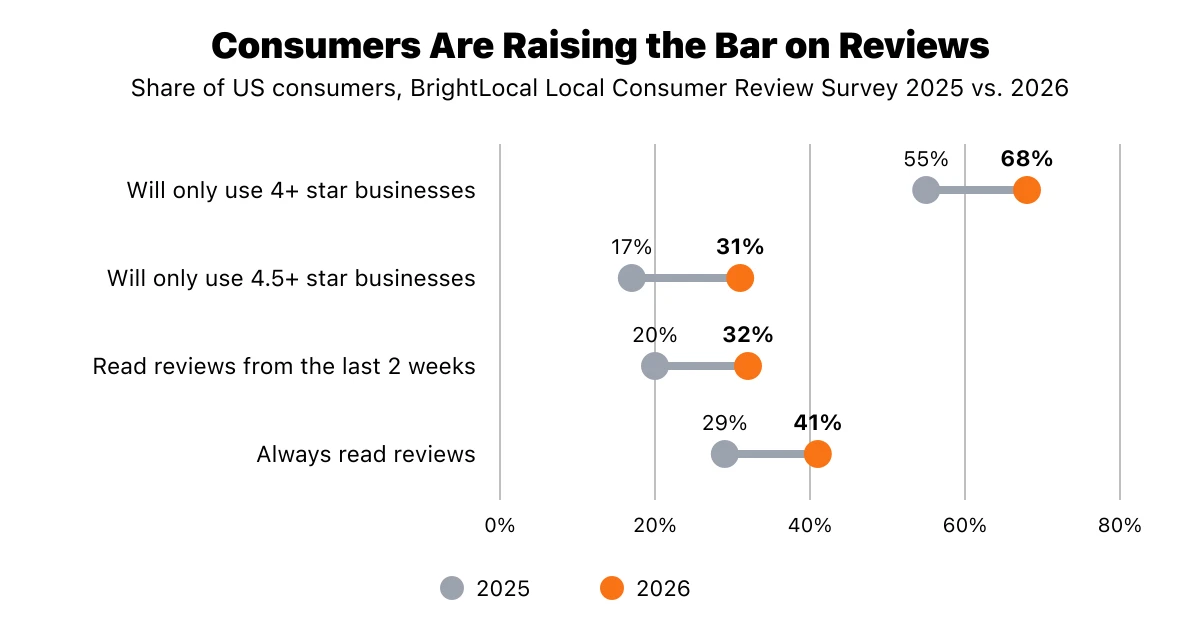
Source: BrightLocal Local Consumer Review Survey 2026.
BrightLocal’s 2026 survey of 1,002 US consumers found that 68% will only use a business rated four stars or higher, up from 55% a year earlier, and 31% now require at least 4.5 stars. The share who “always” read reviews rose from 29% to 41%.
Recency matters too: 74% look for reviews from the last three months, and 32% look at reviews from just the last two weeks, up from 20%. A profile with 40 reviews from 2022 looks less active than one with 15 from this year.
A few ways to earn more of them:
- Share your review link by text or email so clients land directly on the review form.
- Ask at the right moment. Closing day and the keys handoff are when clients are happiest.
- Make it easy to be specific. Suggest they mention the neighborhood or whether you helped them buy or sell, but don’t script the review or ask for a rating.
- Never offer incentives or ask selectively. Google’s review policy bans both, and sending only happy clients to Google (review gating) can get reviews removed.
Reply to positive and critical customer reviews alike, since BrightLocal found 89% of consumers expect business owners to respond. When you answer a bad one, stay calm and never reveal a client’s finances or reasons for moving.
Our reputation management guide for real estate covers scripts, compliance rules, and how to handle negative reviews.
Keep your profile active with posts and updates
An active, current profile tells potential clients you’re working right now. Posts don’t carry the ranking weight of categories or reviews, but they give people a reason to click through to your site, and a profile that hasn’t changed in two years looks abandoned.
Ideas that work for agents:
💡 New listing posts with a photo and details like price, beds, and baths, linked to the property page on your site
💡 Open house announcements with the date and time
💡 Just sold posts that show recent activity in a neighborhood
💡 Monthly market updates and neighborhood guides for the areas you cover
Keep the rest of your profile fresh, too. Add new photos every few weeks, update holiday hours, and expand the areas you serve when you start working a new part of town.
The Q&A section isn’t worth your time anymore. Google retired the questions-and-answers API on November 3, 2025, and has since replaced owner-answered questions with Ask Maps, which generates answers on its own (BrightLocal). Any guide that still recommends “seeding” your own questions is working from outdated information.
How your profile shows up in AI search
Your profile now doubles as a data source for AI. Ask Maps, a Gemini-powered feature that answers questions about local businesses, was available in the US and India as of March 2026, according to BrightLocal.
It builds answers from your profile, your reviews, and your website. You can’t edit those answers directly; you can only improve the details they draw on.
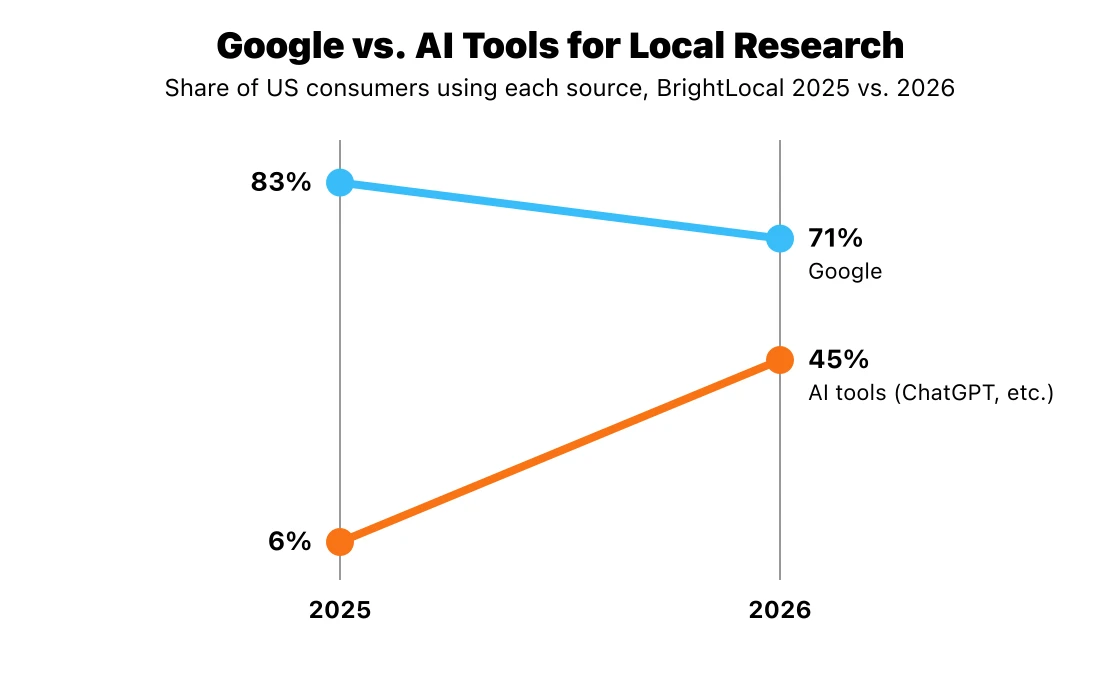
Source: BrightLocal Local Consumer Review Survey 2026.
Consumer habits are moving quickly. BrightLocal found that the share of consumers using ChatGPT and other AI tools for local business recommendations jumped from 6% to 45% in a single year, while the share reading reviews on Google fell from 83% to 71%. In the same survey, 82% said they read AI-generated review summaries.
Few agents show up in AI answers yet. Local Falcon’s Realtor AI Visibility Index, published in August 2026, found that 91.5% of RealTrends-ranked agents with websites were never named in AI answers to “best realtor near me”-style searches across the 100 largest US cities. Local Falcon sells AI visibility tracking, so treat the figure as directional.
Because Google uses your profile as a source, the fixes overlap with good local SEO:
🌟 Fill in every profile field, so AI tools have accurate facts to quote.
🌟 Encourage detailed reviews that mention neighborhoods, property types, and services. AI summaries pull from that text.
🌟 Keep details identical everywhere. AI tools draw on your profile, website, and directory listings, so mismatched details can produce wrong or missing answers.
🌟 Publish local pages on your website that answer the questions clients ask AI.
For the full playbook, see our guide to AEO for real estate.
Track your results in the Performance view
Check your numbers once a month. To see your GMB profile stats, open the Performance dashboard from your profile. It shows how many people viewed it, which searches they used to find you, and how many ended up interacting with your profile through calls, website clicks, or direction requests.
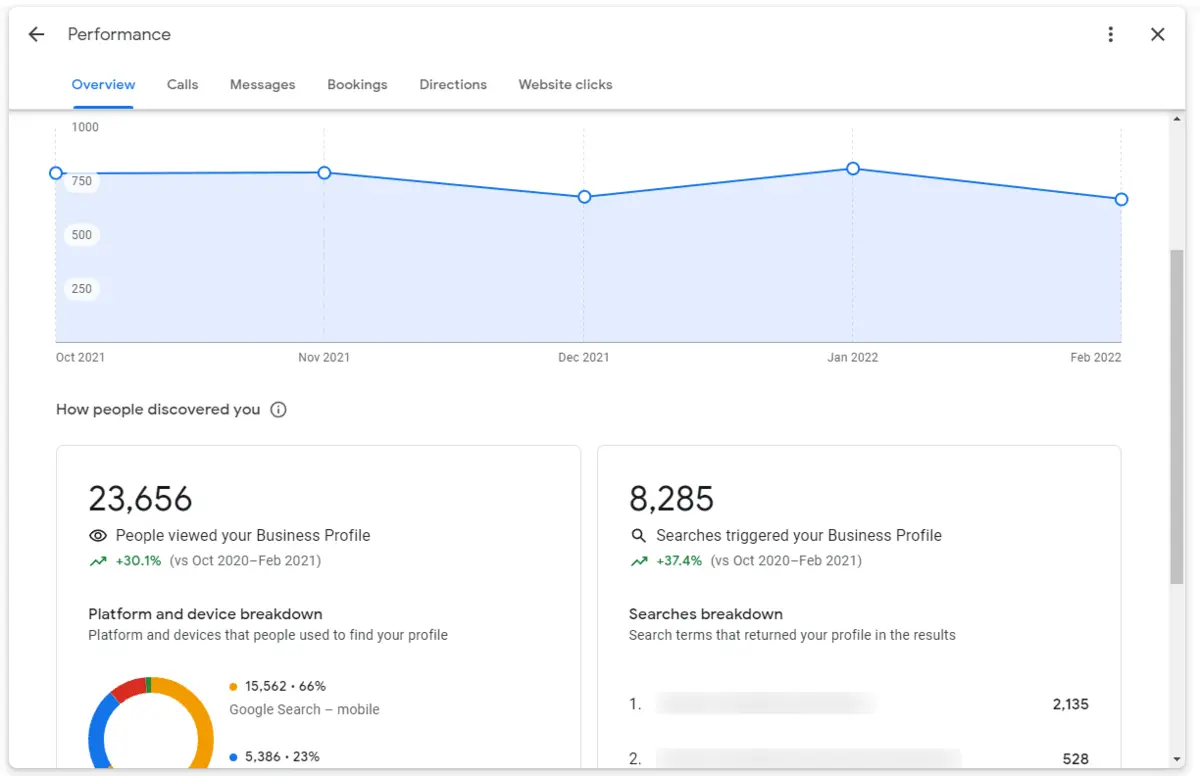
Source: Igniting Business.
A few habits make the numbers more useful:
- Watch the search terms. If people mostly find you by name, your profile is helping with referrals but not yet winning non-branded searches. Revisit your categories and services.
- Tag your website link. Add UTM parameters to the link on your profile so profile traffic shows up separately in Google Analytics. If you use Google Search Console, compare it with how your website ranks for the same searches. Our guide to Google Analytics metrics for real estate explains what to track.
- Compare views to actions. High views with few calls or clicks usually means your photos, rating, or review count are losing out to the agents listed next to you.
Common mistakes that get real estate profiles suspended
Most suspensions come from a mismatch between your profile and Google’s guidelines. Avoid these, and you avoid most of the risk:
- Keywords or city names in the title. Stick to the name you use on your signage, business cards, and website.
- A virtual office, P.O. box, mailbox, or brokerage address you don’t work from. Hide your address and list the areas you serve instead.
- Duplicate profiles. Each agent gets a single profile, not one per city or specialty.
- Profiles for assistants or team members who don’t meet clients directly.
- Brokerage branding in the title when your office already has its own profile.
- Big edits all at once. Changing your name, address, and category on the same day can trigger a fresh round of verification, according to local search practitioners.
If your profile is suspended, don’t create a new one. Fix whatever caused the problem, then submit a reinstatement request through Google’s help center with supporting evidence such as your real estate license, a business registration, and photos of your office or signage.
Make the click worth it
Your profile gets prospects to your phone and your website. What they find after the click decides whether they reach out. A fast, modern site with IDX search, neighborhood pages, and lead capture turns profile visits into conversations and helps you grow your real estate business beyond referrals.
Placester’s agent websites are built for that job, and with Placester’s AI website builder, you can launch a site in minutes without hiring a designer or developer. For everything else that helps you rank, see our guide to real estate SEO.
AI Websites for Real Estate
Get a custom, ready-to-edit website
in less than 4 minutes.
Frequently asked questions
Is a Google Business Profile free for realtors?
Yes. Creating and maintaining a profile costs nothing. Google’s paid Local Services Ads are a separate product, and you don’t need them to appear in the map pack.
Is a Google My Business profile the same as a Google Business Profile?
Yes, it’s the same listing under its old name. Older guides about Google My Business for real estate agents that tell you to claim your Google My Business listing or optimize your Google My Business page describe the same basic steps covered here. Optimizing a GMB profile works the same way today, but skip their advice about Q&A and Google+.
Can I have my own profile if I work for a brokerage?
Usually, yes. Google treats real estate agents as individual practitioners, so you can have your own profile if you deal with clients directly and they can reach you during your listed hours. If your office already has its own profile, use only your name in the title.
Can I use a P.O. box for my profile?
No. Google states that “P.O. boxes or mailboxes located at remote locations aren’t acceptable,” and a virtual office you don’t operate from isn’t eligible either. Use a staffed office you actually work from, or hide your address and list your service area.
Why was my real estate Google Business Profile suspended?
The most common causes are keywords in the title, an ineligible address (a virtual office, a P.O. box, or an office you don’t work from), and duplicate profiles. In 2026, some agents at cloud-based brokerages also reported suspensions. Fix the issue, then request reinstatement with evidence.
Published on
(Last updated on
)